Agentic Hat
Agent
Showcase
Pricing
Buddy
Sign In
Sign Up
Agentic Hat
Autonomous AI Agent Platform · A FewBox product
Navigation
Agent
Showcase
Pricing
Buddy
Docs
Sign Up
Follow
Contact Us
[email protected]
Agentic Hat
Autonomous AI Agent Platform · A FewBox product
Navigation
Agent
Showcase
Pricing
Buddy
Docs
Sign Up
Follow
Contact Us
[email protected]
Privacy Policy
Extension Privacy
© 2026 FewBox

How do I make a professional AI headshot?

Upload a selfie, describe the look you want, and generate — minutes.

Prompt used
Copy
Turn this selfie into a professional corporate headshot — head-and-shoulders, eye-level, soft studio lighting, neutral office-blur background, business-casual attire, natural approachable expression. Keep my face and identity exactly the same — same features, no beautifying into a different person. Give me a few variations.
Try this template
Turn this selfie into a professional corporate headshot — head-and-shoulders, eye-level, soft studio lighting, neutral office-blur background, business-casual attire, natural approachable expression. Keep my face and identity exactly the same — same features, no beautifying into a different person. Give me a few variations.
fewbox-thia-agent-storm
load_skill: vision
Skill: vision
fewbox_remote_vision_edit_image
The richer the detail, the more worth the wait...
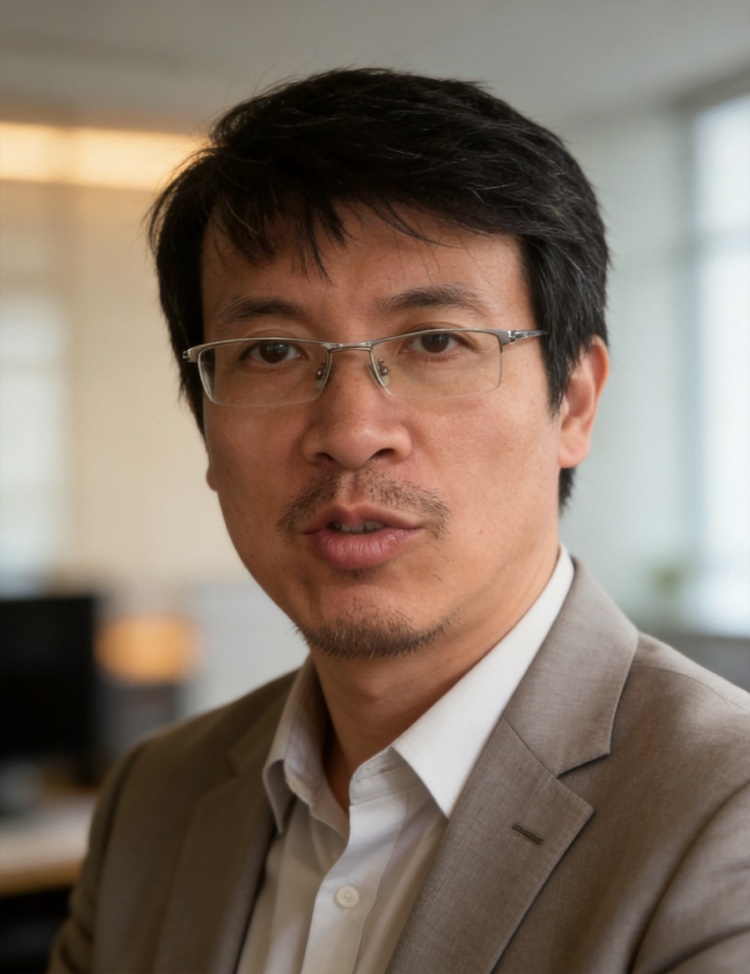
fewbox_remote_vision_edit_image, fewbox_remote_vision_edit_image, fewbox_remote_vision_edit_image
The richer the detail, the more worth the wait...
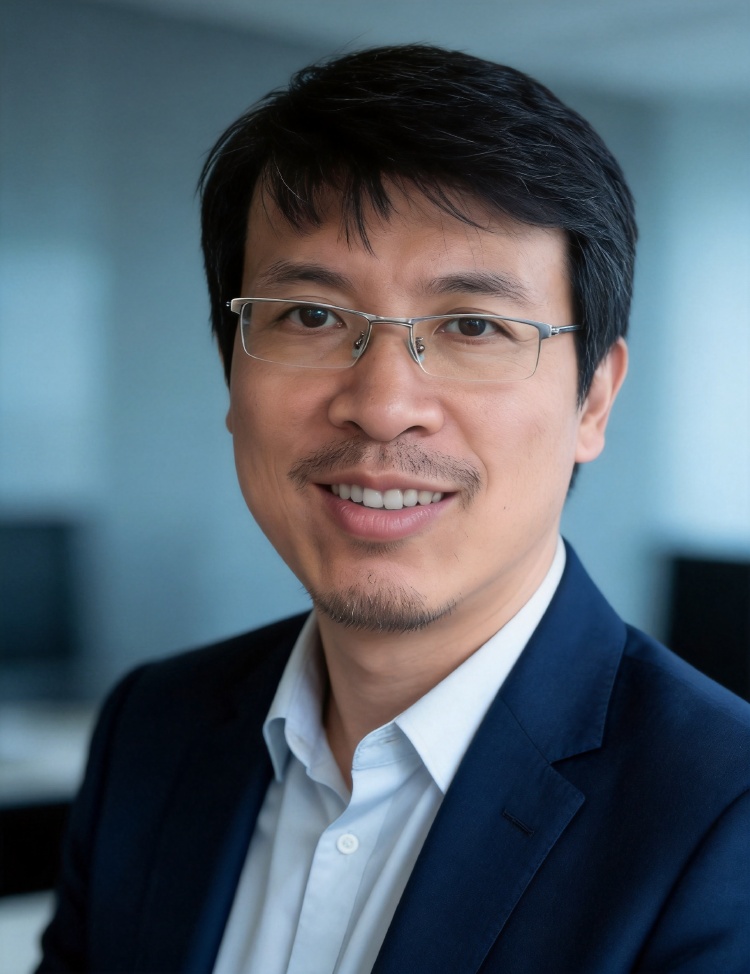
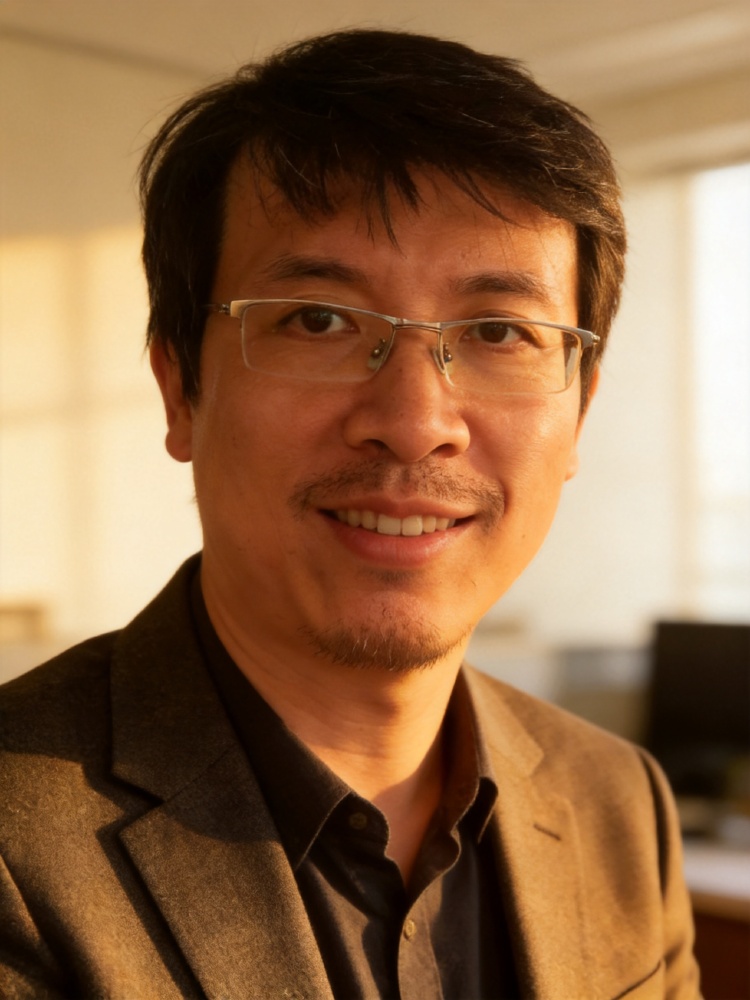
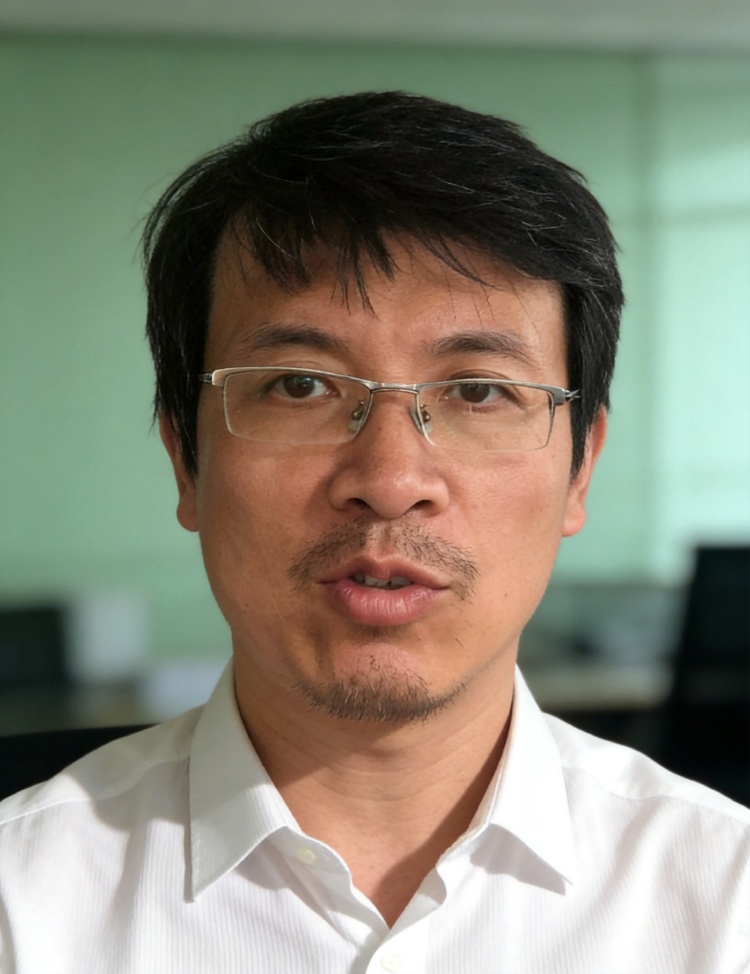
I see the selfie - you've got glasses and a casual indoor setting with some plants behind you. Let me create several professional headshot variations for you, keeping your exact face and features while changing the setting and attire.
The richer the detail, the more worth the wait...
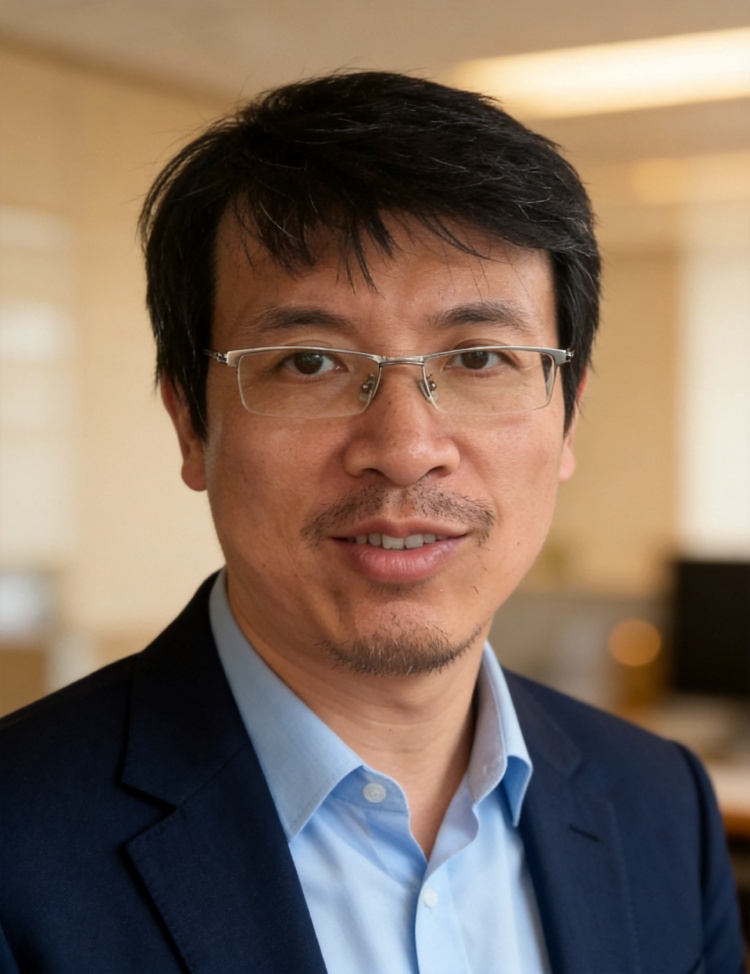
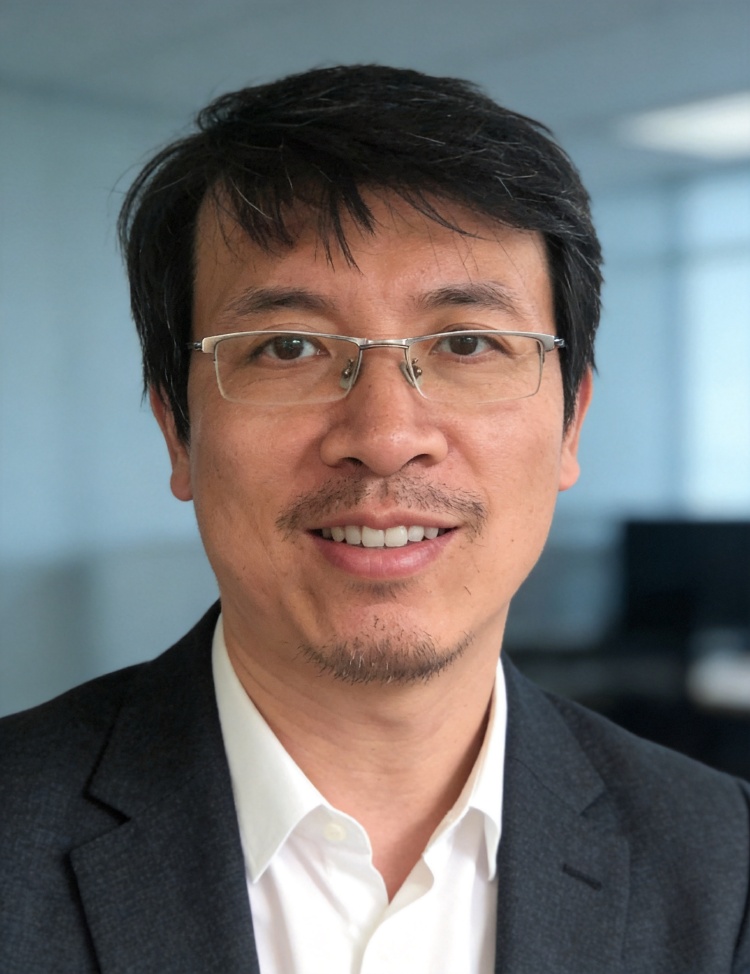
[Blocked] This tool has been called too many times in this conversation turn. Please stop calling tools and return your best result to the user. (edit_image called 7 times, limit: 6)
[Blocked] This tool has been called too many times in this conversation turn. Please stop calling tools and return your best result to the user. (edit_image called 8 times, limit: 6)

Here are 4 professional corporate headshot variations for you:

Variation 1 — Warm beige office background, navy blazer, soft warm lighting

Variation 2 — Cool gray-blue background, charcoal blazer, clean even lighting

Variation 3 — Cream minimalist background, forest green blazer, golden-hour style lighting

Variation 4 — Light gray background, light gray blazer, neutral balanced lighting

Each keeps your exact face, features, and glasses — just transformed into a professional studio setting with business-casual attire and that soft office-background blur you wanted. They should work well for LinkedIn, company websites, or any professional profile.

Take a look and let me know if you'd like any adjustments — different background tones, attire colors, or lighting style.

A professional headshot used to mean booking a photographer. With AI you upload a selfie, describe the look, and get a business-ready portrait in minutes. Here's how — with an honest take on quality.

Step by step

  1. Start with a clear, front-facing selfie. Even, natural light and a sharp face give the AI the most to work with — the better your selfie, the more the result looks like you.
  2. Describe the headshot you want. Attire ("navy blazer, white shirt"), background ("soft grey studio" or "blurred office"), and framing ("head-and-shoulders, eye-level").
  3. Generate and pick. In minutes you get a few options; choose the one that looks most like you and most polished.
  4. Refine in plain language. "Warmer lighting," "darker background," "a slight smile" — until it's right.

Is it LinkedIn-ready?

Yes — a clean, well-lit, business-attired portrait is exactly what LinkedIn, a résumé, or a company page needs, and the results from a single selfie are genuinely strong: professional, and recognizably you. Generate a few and pick your favorite; for the closest possible likeness, a couple more selfies give the model even more to match.

Can ChatGPT make a headshot?

It can edit a photo, but general tools tend to redraw your face — subtly turning you into someone who isn't quite you, which defeats the point of a headshot. A dedicated agent is told to keep your real face and change only the attire, lighting, and background.

Free vs. paid headshot tools

Free generators (Canva, Adobe Firefly, NoteGPT) are quick but often low-quality or watermarked; paid services (HeadshotPro, Aragon, Betterpic) charge $29–59 for a trained model. This sits in between: free starter credits that don't expire and no watermark, so you can make a real headshot and judge it before paying anything.

Are my photos private?

Selfies are personal. Your photos are used to produce your result — not sold, not used to train public models — and you can delete them. Always check what any headshot tool keeps before uploading.

FAQ

Is there a free AI headshot generator?

Yes — you can start here with free starter credits that don't expire, enough to make a real headshot before paying. No watermark, no forced subscription.

Can ChatGPT make a professional headshot?

It can edit an image, but general tools tend to redraw your face and change your likeness. A dedicated headshot agent keeps your real face and changes only attire, lighting, and background.

Are AI headshots good enough for LinkedIn?

Yes — a clean, business-attired, well-lit portrait is what LinkedIn wants, and the results are professional and recognizably you. Generate a few and pick your favorite.

What's the best AI headshot generator?

The best one keeps your actual likeness and gives usable quality without a big upfront cost. Judge any tool on identity match and whether you can try it free before paying.

Do I need a lot of photos?

No — one clear, front-facing selfie works to start. More or better selfies improve how closely the result matches your face, but a single good photo is enough to try.

Are my uploaded photos private?

Your photos are used to produce your result, not sold or used to train public models, and you can delete them. Selfies are sensitive — check what any tool keeps.

Try this template

How do I make a professional AI headshot?

Upload a selfie, describe the look you want, and generate — minutes.

Prompt used
Copy
Turn this selfie into a professional corporate headshot — head-and-shoulders, eye-level, soft studio lighting, neutral office-blur background, business-casual attire, natural approachable expression. Keep my face and identity exactly the same — same features, no beautifying into a different person. Give me a few variations.
Try this template
Turn this selfie into a professional corporate headshot — head-and-shoulders, eye-level, soft studio lighting, neutral office-blur background, business-casual attire, natural approachable expression. Keep my face and identity exactly the same — same features, no beautifying into a different person. Give me a few variations.
fewbox-thia-agent-storm
load_skill: vision
Skill: vision
fewbox_remote_vision_edit_image
The richer the detail, the more worth the wait...
fewbox_remote_vision_edit_image, fewbox_remote_vision_edit_image, fewbox_remote_vision_edit_image
The richer the detail, the more worth the wait...
I see the selfie - you've got glasses and a casual indoor setting with some plants behind you. Let me create several professional headshot variations for you, keeping your exact face and features while changing the setting and attire.
The richer the detail, the more worth the wait...
[Blocked] This tool has been called too many times in this conversation turn. Please stop calling tools and return your best result to the user. (edit_image called 7 times, limit: 6)
[Blocked] This tool has been called too many times in this conversation turn. Please stop calling tools and return your best result to the user. (edit_image called 8 times, limit: 6)

Here are 4 professional corporate headshot variations for you:

Variation 1 — Warm beige office background, navy blazer, soft warm lighting

Variation 2 — Cool gray-blue background, charcoal blazer, clean even lighting

Variation 3 — Cream minimalist background, forest green blazer, golden-hour style lighting

Variation 4 — Light gray background, light gray blazer, neutral balanced lighting

Each keeps your exact face, features, and glasses — just transformed into a professional studio setting with business-casual attire and that soft office-background blur you wanted. They should work well for LinkedIn, company websites, or any professional profile.

Take a look and let me know if you'd like any adjustments — different background tones, attire colors, or lighting style.

A professional headshot used to mean booking a photographer. With AI you upload a selfie, describe the look, and get a business-ready portrait in minutes. Here's how — with an honest take on quality.

Step by step

  1. Start with a clear, front-facing selfie. Even, natural light and a sharp face give the AI the most to work with — the better your selfie, the more the result looks like you.
  2. Describe the headshot you want. Attire ("navy blazer, white shirt"), background ("soft grey studio" or "blurred office"), and framing ("head-and-shoulders, eye-level").
  3. Generate and pick. In minutes you get a few options; choose the one that looks most like you and most polished.
  4. Refine in plain language. "Warmer lighting," "darker background," "a slight smile" — until it's right.

Is it LinkedIn-ready?

Yes — a clean, well-lit, business-attired portrait is exactly what LinkedIn, a résumé, or a company page needs, and the results from a single selfie are genuinely strong: professional, and recognizably you. Generate a few and pick your favorite; for the closest possible likeness, a couple more selfies give the model even more to match.

Can ChatGPT make a headshot?

It can edit a photo, but general tools tend to redraw your face — subtly turning you into someone who isn't quite you, which defeats the point of a headshot. A dedicated agent is told to keep your real face and change only the attire, lighting, and background.

Free vs. paid headshot tools

Free generators (Canva, Adobe Firefly, NoteGPT) are quick but often low-quality or watermarked; paid services (HeadshotPro, Aragon, Betterpic) charge $29–59 for a trained model. This sits in between: free starter credits that don't expire and no watermark, so you can make a real headshot and judge it before paying anything.

Are my photos private?

Selfies are personal. Your photos are used to produce your result — not sold, not used to train public models — and you can delete them. Always check what any headshot tool keeps before uploading.

FAQ

Is there a free AI headshot generator?

Yes — you can start here with free starter credits that don't expire, enough to make a real headshot before paying. No watermark, no forced subscription.

Can ChatGPT make a professional headshot?

It can edit an image, but general tools tend to redraw your face and change your likeness. A dedicated headshot agent keeps your real face and changes only attire, lighting, and background.

Are AI headshots good enough for LinkedIn?

Yes — a clean, business-attired, well-lit portrait is what LinkedIn wants, and the results are professional and recognizably you. Generate a few and pick your favorite.

What's the best AI headshot generator?

The best one keeps your actual likeness and gives usable quality without a big upfront cost. Judge any tool on identity match and whether you can try it free before paying.

Do I need a lot of photos?

No — one clear, front-facing selfie works to start. More or better selfies improve how closely the result matches your face, but a single good photo is enough to try.

Are my uploaded photos private?

Your photos are used to produce your result, not sold or used to train public models, and you can delete them. Selfies are sensitive — check what any tool keeps.

Try this template