Can an AI agent browse stores, shoot my product, and upload it to Shopify?
Yes — say "use the browser" and the agent shops, picks, shoots and uploads inside your own Chrome. You just say yes or no.
Prompt used
Copy
Open SHEIN US, search "dress", sort by Most Popular, and bring the first 8 product images into my workspace. Don't pick anything yet.
No credit card required
Failed generations cost 0 credits
Credits never expire
Open SHEIN US, search "dress", sort by Most Popular, and bring the first 8 product images into my workspace. Don't pick anything yet.
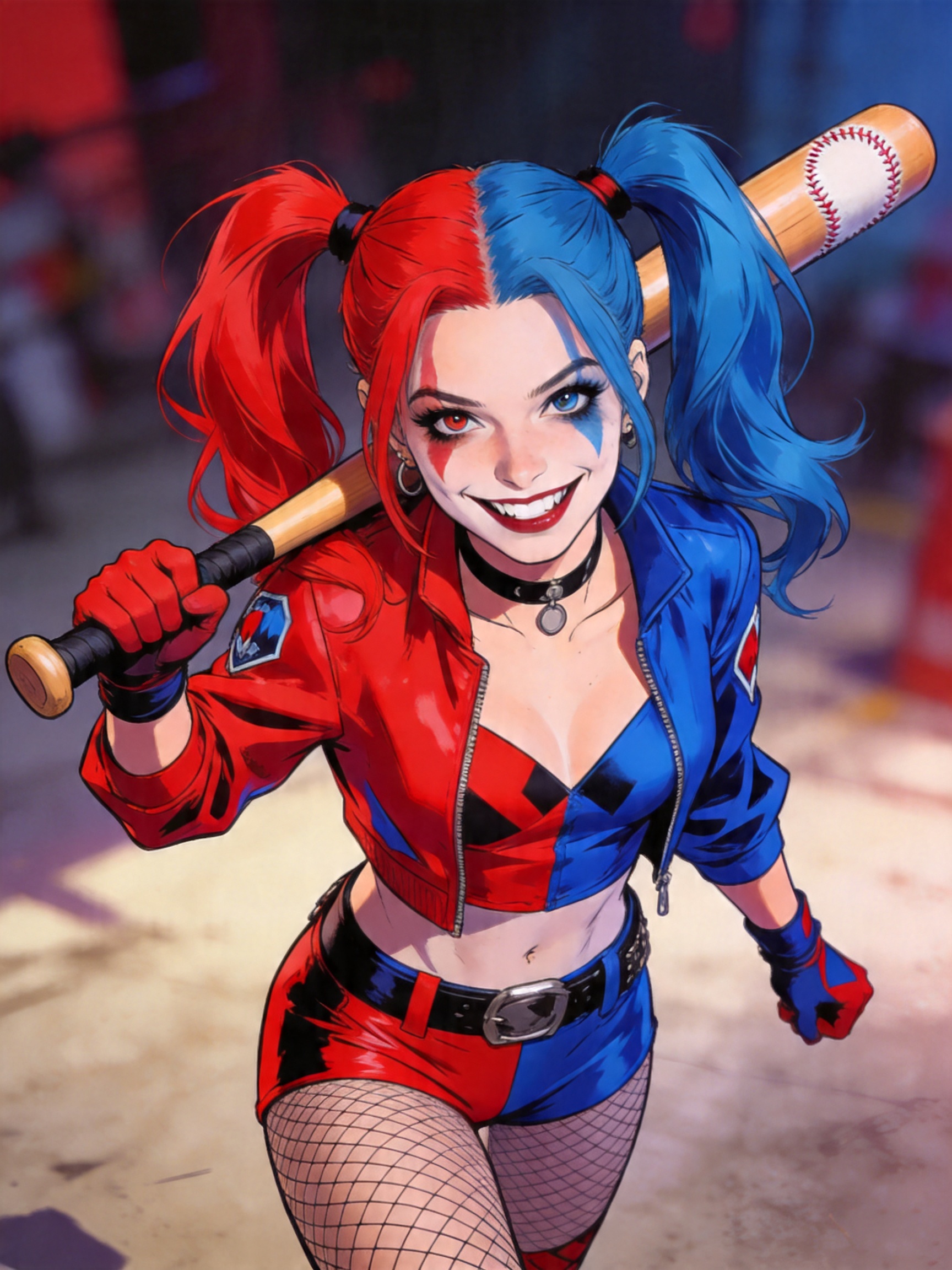
load_skill: browser
Skill: browser ▾
browser_open_tab
Opened a new tab (tabId 530637918) at https://us.shein.com.
browser_find
Matches for "search": ▾
browser_form_input
Filled ref_2.
browser_click
Clicked ref_1 → button "Search". The URL gained ici=s1`EditSearch`dress`_fb`d0`PageOthers & search_s… ▾
browser_wait_for
Ready: text "dress" (3ms, now on us.shein.com).
browser_find
Matches for "Sort": ▾
browser_click
Clicked ref_2 → div "Sort By". The URL did not change (this site applies the action in-page, so the … ▾
browser_read_dom
Elements: ▾
browser_read_dom
Elements: ▾
browser_click
Clicked ref_5 → div "Sort By: Recommend". The URL did not change (this site applies the action in-pa… ▾
browser_tabs
Open tabs: ▾
browser_navigate
Tab 530637918 is now on us.shein.com — "Search dress | SHEIN USA".
browser_wait_for
Ready: text "dress" (6ms, now on us.shein.com).
browser_scroll
Scrolled to 1068 of 3175px. (That tab is in the background — Chrome throttles hidden tabs, so lazy-l… ▾
browser_scroll
Reached the bottom of the page. (That tab is in the background — Chrome throttles hidden tabs, so la… ▾
browser_scroll
At the top of the page. (That tab is in the background — Chrome throttles hidden tabs, so lazy-loade… ▾
browser_focus_tab
Tab 530637918 (us.shein.com) is now in front.
browser_extract_images
Collected 8 image(s) from https://us.shein.com/pdsearch/dress/?sort=8 into the image workspace (orde… ▾
Done. I opened SHEIN US, searched "dress," sorted by Most Popular, and pulled the top 8 product images into your workspace. Here's what came in:
- Nuvra Sexy Black Knit Spaghetti Strap Sleeveless Mini Dress
- Nuvra Sexy Black Knit Spaghetti Strap Sleeveless Mini Dress (alt view)
- Enliva Plus Size Leopard Print Casual Vacation Strap Dress
- Enliva Plus Size Leopard Print Casual Vacation Strap Dress (alt view)
- ROMWE Street Life Women's PUNK Music Festival Star Print Mini Dress
- ROMWE Street Life Women's PUNK Music Festival Star Print Mini Dress (alt view)
- SHEIN Allurite Women's Elegant Casual Sexy Short Dress (Orange And Pink)
- SHEIN Allurite Women's Elegant Casual Sexy Short Dress (alt view)
I didn't narrow or pick anything — all 8 are sitting in your workspace for you to review. Let me know what you want to do with them.
Also pull in my mood board "pink". Then keep only the 3 that look most like my brand — soft, minimal, pastel — and drop the rest.
browser_list_moodboards
Mood boards: ▾
browser_import_moodboard
Collected 4 image(s) from moodboard://d1c17057-50f0-4470-958f-ba2f702be293 into the image workspace: ▾
fewbox_remote_perception_perceive_images
Let's break down each image in order, with a brief description and soft/minimal pastel aesthetic rat… ▾
browser_keep_images
Narrowed the image workspace to 3 image(s). Ask the user to confirm/adjust the selection, then proce… ▾
Done. I pulled in the 4 images from your "pink" mood board and perceived all 12 images together. Based on your "soft, minimal, pastel" brand criteria, I kept the top 3 matches and dropped the rest:
- Image 10 (9/10): Soft pastel pink ruffled asymmetrical mini skirt — airy, minimal background
- Image 11 (9/10): Simple pastel pink ruched mini skirt — clean, neutral backdrop
- Image 9 (8/10): White crop top + pink sequin skirt set — gentle, flattering silhouette
The 8 SHEIN dresses were all too bold, dark, or saturated to fit your aesthetic. Your workspace is now narrowed to those 3. Confirm or adjust, then tell me what you want to do with them.
Good. Now open the product page of the SHEIN dress that came closest to my brand (the Allurite one in orange and pink) and read me its fabric, fit and available sizes. Take a screenshot so I can see the page.
browser_read_dom
Browser tool browser_read_dom failed: PERMISSION_DENIED: Site access to us.shein.com (read) has not … ▾
I need access to the SHEIN tab to click through to the Allurite dress product page. There's an access card in the chat — please click Allow for us.shein.com, then tell me when it's done and I'll continue.
I have allowed access to us.shein.com — please continue. Original task: "Also pull in my mood board "pink". Then keep only the 3 that look most like my brand — soft, minimal, pastel — and drop the rest.". Do not ask for access again; call the same browser tool you were about to use and carry on — do not start over. My image workspace currently holds 3 images — report only what you actually did; do not claim to have kept images you did not.
browser_find
Matches for "Allurite": ▾
browser_click
Clicked ref_1 → a "SHEIN Allurite Women's Elegant Casual Sexy Short Dress, Summ". The URL did not ch… ▾
browser_open_tab
Opened a new tab (tabId 530637933) at https://us.shein.com/SHEIN-Allurite-Women-s-Elegant-Casual-Sex… ▾
browser_wait_for
Ready: text "Allurite" (3ms, now on us.shein.com).
browser_read_page, browser_screenshot
Page "SHEIN Allurite Women's Elegant Casual Sexy Short Dress, Summer Beach Holiday Vacation Vacation… ▾
Screenshot of us.shein.com

browser_find
Nothing on the page matches "Material". Try a shorter or different wording, browser_scroll to load m… ▾
browser_scroll
Scrolled to 471 of 4197px. (That tab is in the background — Chrome throttles hidden tabs, so lazy-lo… ▾
browser_scroll
Scrolled to 942 of 4197px. (That tab is in the background — Chrome throttles hidden tabs, so lazy-lo… ▾
browser_read_page
Page "SHEIN Allurite Women's Elegant Casual Sexy Short Dress, Summer Beach Holiday Vacation Vacation… ▾
browser_read_dom
No elements match "fabric composition material care" (247 elements on the page without the filter) —… ▾
Here's what I found on the SHEIN Allurite Women's Elegant Casual Sexy Short Dress (Orange And Pink / Multicolor):
Price: $17.99 (down from $20.19)
Fabric: The page doesn't list an explicit material composition. From the description and reviews, it's a stretchy, breathable, lightweight fabric — reviewers call it "amazing texture," "not see-through," and "comfortable and sexy." The design features kimono sleeves, tie-dye print, and a layered/tiered cut.
Fit:
- 79% of reviewers say True to Size
- 20% say Runs Small
- 1% say Runs Large
- Reviewers describe it as stretchy and body-skimming without being clingy.
Available Sizes:
- US 2 (XS)
- US 4 (S)
- US 6 (M)
- US 8/10 (L) — almost sold out
- US 12 (XL)
- US 14 (XXL)
Rating: 4.30/5 from 100+ reviews. It's tagged as the #1 Bestseller in "Romantic Multi Tone Mini Dresses."
I took a screenshot of the product page — you should see it right above this message. Let me know if you want me to scroll down for more detail or check the size guide.
Allowed. Continue.
browser_focus_tab
Tab 530637933 (us.shein.com) is now in front.
browser_read_page, browser_screenshot
Page "SHEIN Allurite Women's Elegant Casual Sexy Short Dress, Summer Beach Holiday Vacation Vacation… ▾
Screenshot of us.shein.com

browser_scroll
Scrolled to 1413 of 4363px. New content may have loaded — re-run browser_extract_images / browser_re… ▾
browser_read_page
Page "SHEIN Allurite Women's Elegant Casual Sexy Short Dress, Summer Beach Holiday Vacation Vacation… ▾
browser_scroll
Scrolled to 1884 of 4363px. New content may have loaded — re-run browser_extract_images / browser_re… ▾
browser_read_page
Page "SHEIN Allurite Women's Elegant Casual Sexy Short Dress, Summer Beach Holiday Vacation Vacation… ▾
browser_scroll
Scrolled to 2355 of 4363px. New content may have loaded — re-run browser_extract_images / browser_re… ▾
browser_find
Nothing on the page matches "Material". Try a shorter or different wording, browser_scroll to load m… ▾
browser_find
Matches for "Care": ▾
browser_find
Matches for "Size & Fit": ▾
browser_click
Clicked ref_3 → button "Size & Fit". The URL did not change (this site applies the action in-page, s… ▾
browser_wait_for
Ready: page load (302ms, now on us.shein.com).
browser_read_page
Page "SHEIN Allurite Women's Elegant Casual Sexy Short Dress, Summer Beach Holiday Vacation Vacation… ▾
browser_scroll
Scrolled to 1966 of 4363px. New content may have loaded — re-run browser_extract_images / browser_re… ▾
browser_scroll
Scrolled to 2437 of 4363px. New content may have loaded — re-run browser_extract_images / browser_re… ▾
browser_read_page
Page "SHEIN Allurite Women's Elegant Casual Sexy Short Dress, Summer Beach Holiday Vacation Vacation… ▾
browser_screenshot
Screenshot of us.shein.com

Here's the full rundown on the SHEIN Allurite dress (the orange-and-pink multicolor one):
Fabric: The page doesn't list an explicit material composition — SHEIN often omits this on cheaper listings. However, reviewers consistently describe it as stretchy, breathable, and lightweight with a good texture that isn't see-through.
Fit:
- 79% say True to Size
- 20% say Runs Small
- 1% say Runs Large
- Reviewers call it "comfortable, sexy and stretchy" with a body-skimming cut.
Available Sizes:
- US 2 (XS)
- US 4 (S)
- US 6 (M)
- US 8/10 (L) — almost sold out
- US 12 (XL)
- US 14 (XXL)
Price: $17.99 (down from $20.19). Rated 4.30/5 from 100+ reviews, and it's the #1 bestseller in "Romantic Multi Tone Mini Dresses."
I just took a fresh screenshot of the product page — you should see it right above this message. What's next?
Grab the main product photo of that Allurite dress from the product page into my workspace. Then, using the 3 pink images as style references, shoot the Allurite dress on a model, on a beach at golden hour, 3 images. Keep the garment exactly as it is — same cut, colour, print and length. Only the model, pose and background change.
load_skill: product-shot, browser_extract_images
Skill: product-shot ▾
Collected 4 image(s) from https://us.shein.com/SHEIN-Allurite-Women-s-Elegant-Casual-Sexy-Short-Dres… ▾
Those are from the "You May Also Like" section lower on the page, not the main product photo. Let me scroll to the top and grab the actual Allurite dress image.
At the top of the page. (That tab is in the background — Chrome throttles hidden tabs, so lazy-loade… ▾
browser_focus_tab
Tab 530637933 (us.shein.com) is now in front.
browser_extract_images
Collected 4 image(s) from https://us.shein.com/SHEIN-Allurite-Women-s-Elegant-Casual-Sexy-Short-Dres… ▾
Got it — the main Allurite dress product photo is now in the workspace. Let me load the mood-board workflow and perceive the images so I know exactly what I'm working with.
Skill File: product-shot/references/mood-board-workflow.md ▾
Let's break down each image in order: ▾
I see the layout now. Your workspace has the 3 pink mood board style references (__IMAGE_0__–__IMAGE_2__), plus an extra pink dress product photo (__IMAGE_3__), and the Allurite dress (__IMAGE_8__). The 3 pink references are soft Y2K coquette/pastel minimal style.
Since this is a **garment on a model** scenario, I need to route through the vision skill's garment try-on flow for the highest fidelity. Let me load that.
Skill: vision ▾
load_skill_file, load_skill_file
Skill File: vision/references/garment-try-on.md ▾
Skill File: vision/references/multi-image-intent.md ▾
fewbox_remote_perception_perceive_images
Compact Brand Style Summary ▾
I have the style vocabulary extracted from your 3 pink references: **soft glamour** mood, diffused warm lighting, low-saturation muted pastels, relaxed confident feminine posing, clean minimal composition.
Now I'll use the Allurite dress product photo as the base and generate the 3 beach golden-hour scenes. The dress will stay exactly as it is — same cut, print, color, and length.
The richer the detail, the more worth the wait...
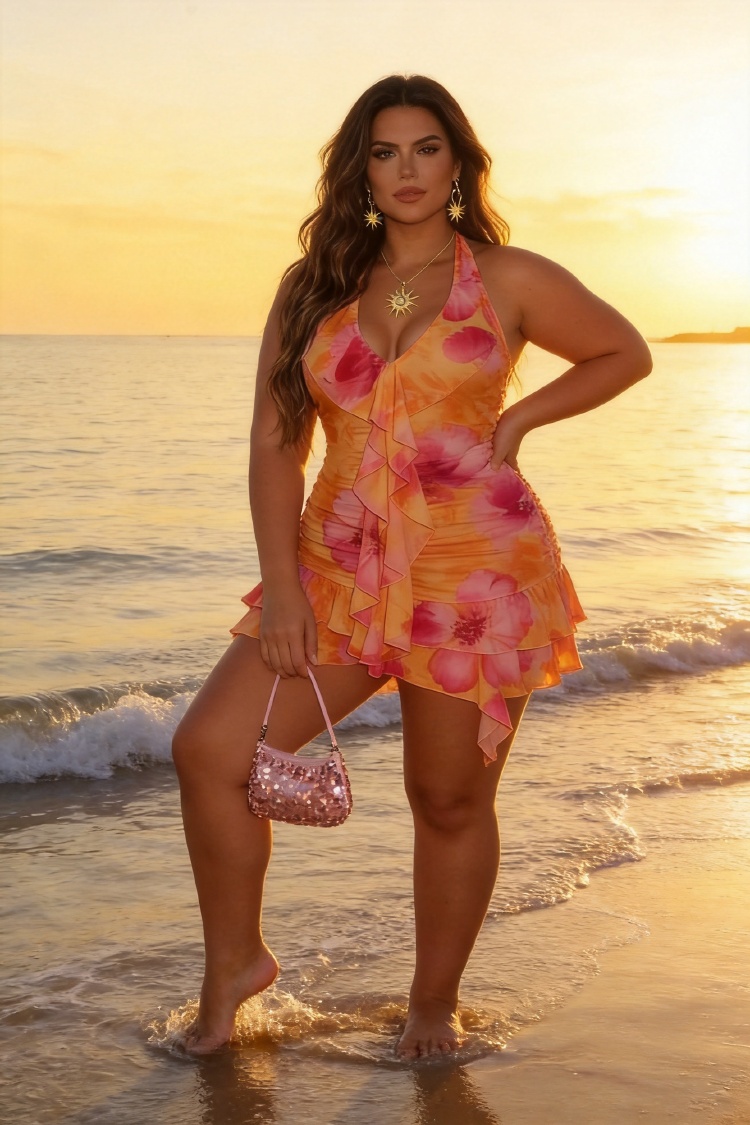
The richer the detail, the more worth the wait...
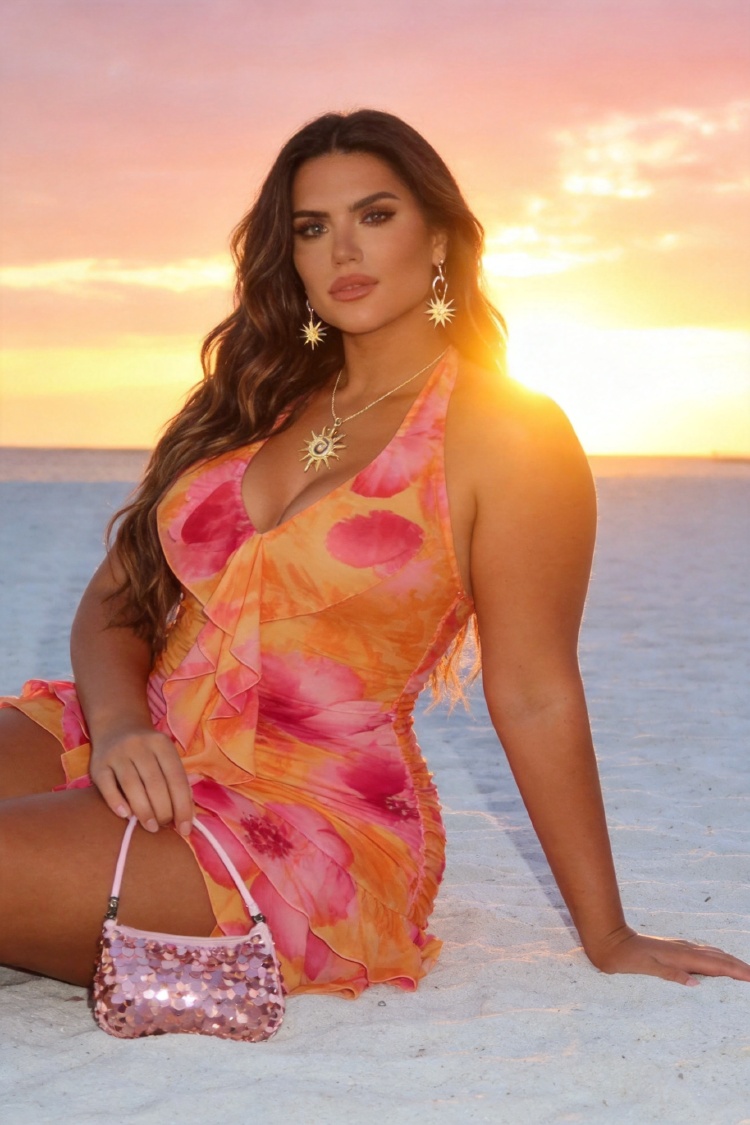
The richer the detail, the more worth the wait...
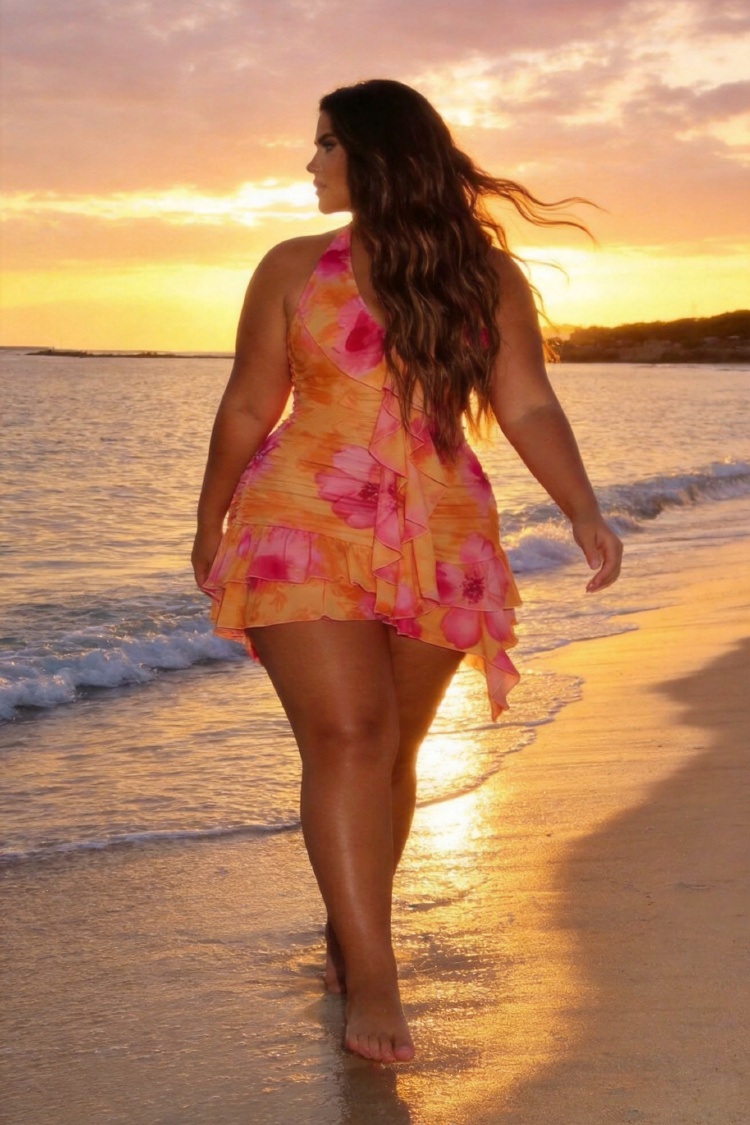
Done. Generated 3 beach golden-hour lifestyle shots of the Allurite dress on a model:
- Standing at the water's edge — soft side-lit, calm ocean behind, relaxed confident pose
- Seated on white sand — warm sunset backlight, pastel pink and gold sky, soft glamour mood
- Walking the shoreline — dress flowing in the breeze, full-body golden light
The dress itself — the orange base, pink floral print, ruffled halter neckline, asymmetrical hem, and mini length — was preserved from the original product photo. The soft, minimal, pastel aesthetic from your pink mood board came through in the lighting, palette, and clean composition.
Take a look at the 3 images above. Let me know if any need a re-roll or if you want adjustments to the model, pose, or lighting.
Upload the first image into the media section of the Shopify product page I have open.
browser_tabs
Open tabs: ▾
I don't see a Shopify product page in your open tabs — just localhost, Agentic Hat, and the SHEIN product page. Could you switch to the Shopify tab, or tell me its tab title so I can find it? Once I locate it, I'll upload the first beach image into the media section.
It's open now (admin.shopify.com, "Add product"). Go ahead.
browser_tabs
Open tabs: ▾
browser_read_dom
Browser tool browser_read_dom failed: PERMISSION_DENIED: Site access to admin.shopify.com (read) has… ▾
I need access to your Shopify admin page to upload the image. There's an access card in the chat for admin.shopify.com — please click Allow, then tell me when it's done and I'll continue.
I have allowed access to admin.shopify.com — please continue. Original task: "It's open now (admin.shopify.com, "Add product"). Go ahead.". Do not ask for access again; call the same browser tool you were about to use and carry on — do not start over. My image workspace currently holds 9 images — report only what you actually did; do not claim to have kept images you did not.
browser_tabs
Open tabs: ▾
browser_read_dom
Elements: ▾
browser_upload_image
Uploaded the image into the file input (ref_86).
Uploaded the first beach golden-hour image into the media section of your Shopify "Add product" page. It landed in the "Drop media to upload" area for the product titled "Hot Dress". The upload completed successfully.
Great — go ahead and click Save.
browser_click
Clicked ref_6 → button "Save". The URL did not change (this site applies the action in-page, so the … ▾
browser_wait_for
Ready: page load (554ms, now on admin.shopify.com).
browser_screenshot
Screenshot of admin.shopify.com

Saved. The product page now shows "Hot Dress" as the saved product in your Shopify admin. The first beach golden-hour image is in the media section and the draft has been saved. You're all set.
The replay above is one conversation, six messages, no scripts. The agent works inside the seller's own Chrome through the Buddy extension, so it sees what you see: your logins, your Shopify admin, your mood board. Here is what happened at each step, and what the agent will not do on its own.
1. Pull the best-sellers
Open SHEIN US, search "dress", sort by Most Popular, and bring the first 8 product images into my workspace. Don't pick anything yet.
The agent opened SHEIN, typed the query, clicked the search button (it had learned that Enter does nothing on this site), switched the sort to Most Popular, scrolled the grid, and extracted the first eight product images into the image workspace. It did not pick — because it was told not to.
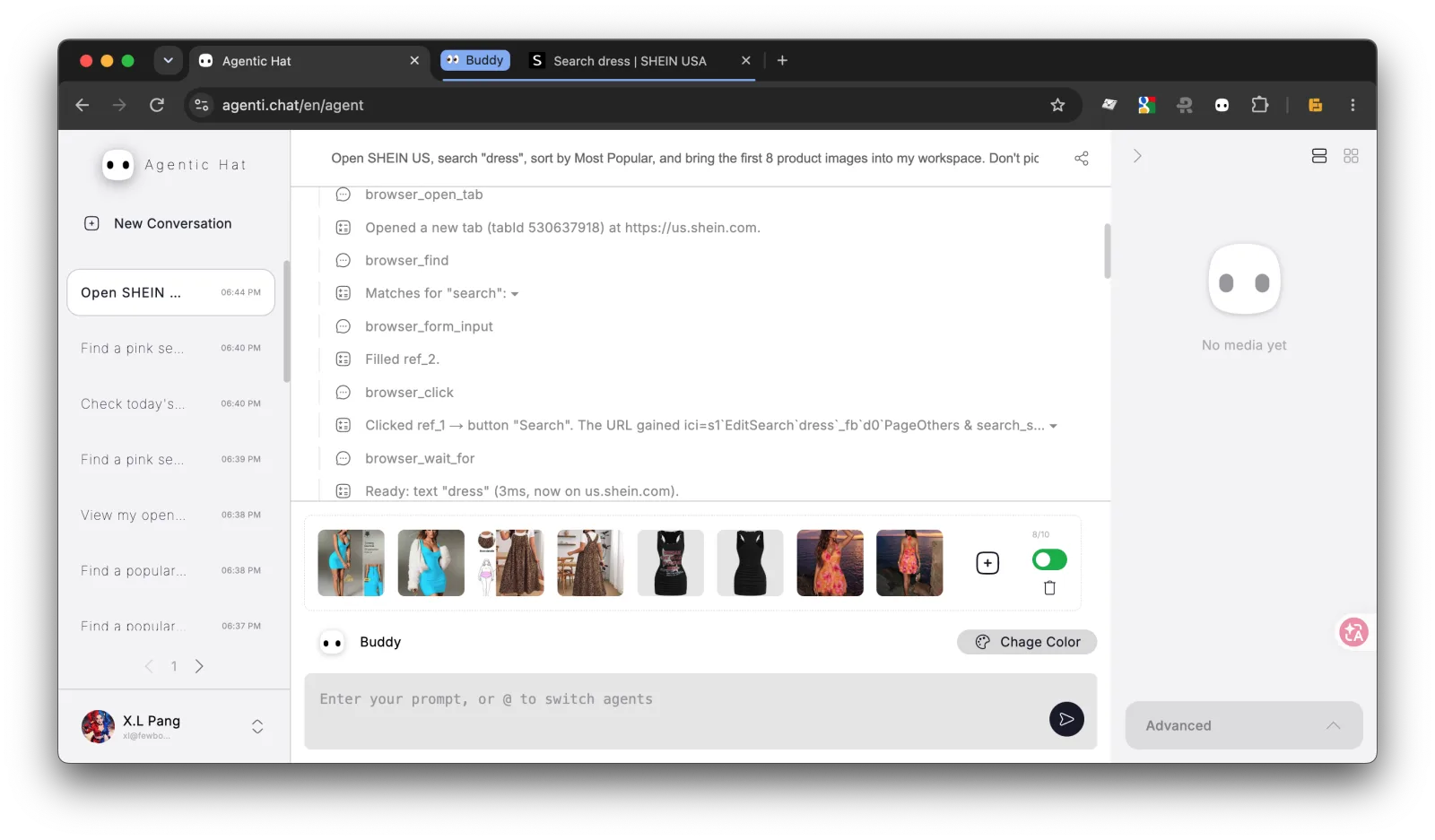
Every tab the agent touches is filed into a 👀 Buddy tab group in your tab bar (you can see it in the screenshots below), so you always know which tabs are its and which are yours.
2. Bring in your own references, keep three
Also pull in my mood board "pink". Then keep only the 3 that look most like my brand — soft, minimal, pastel — and drop the rest.
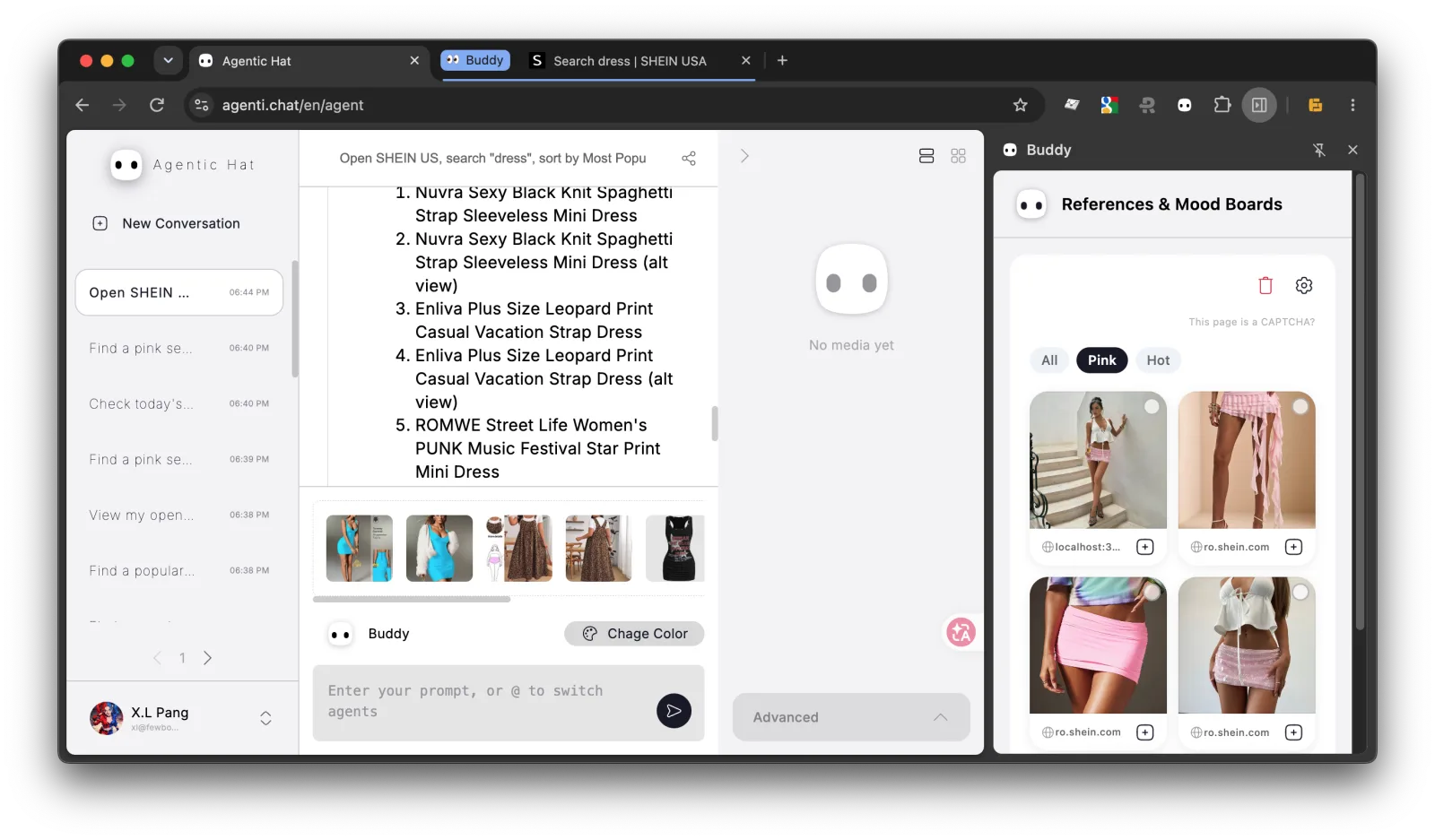
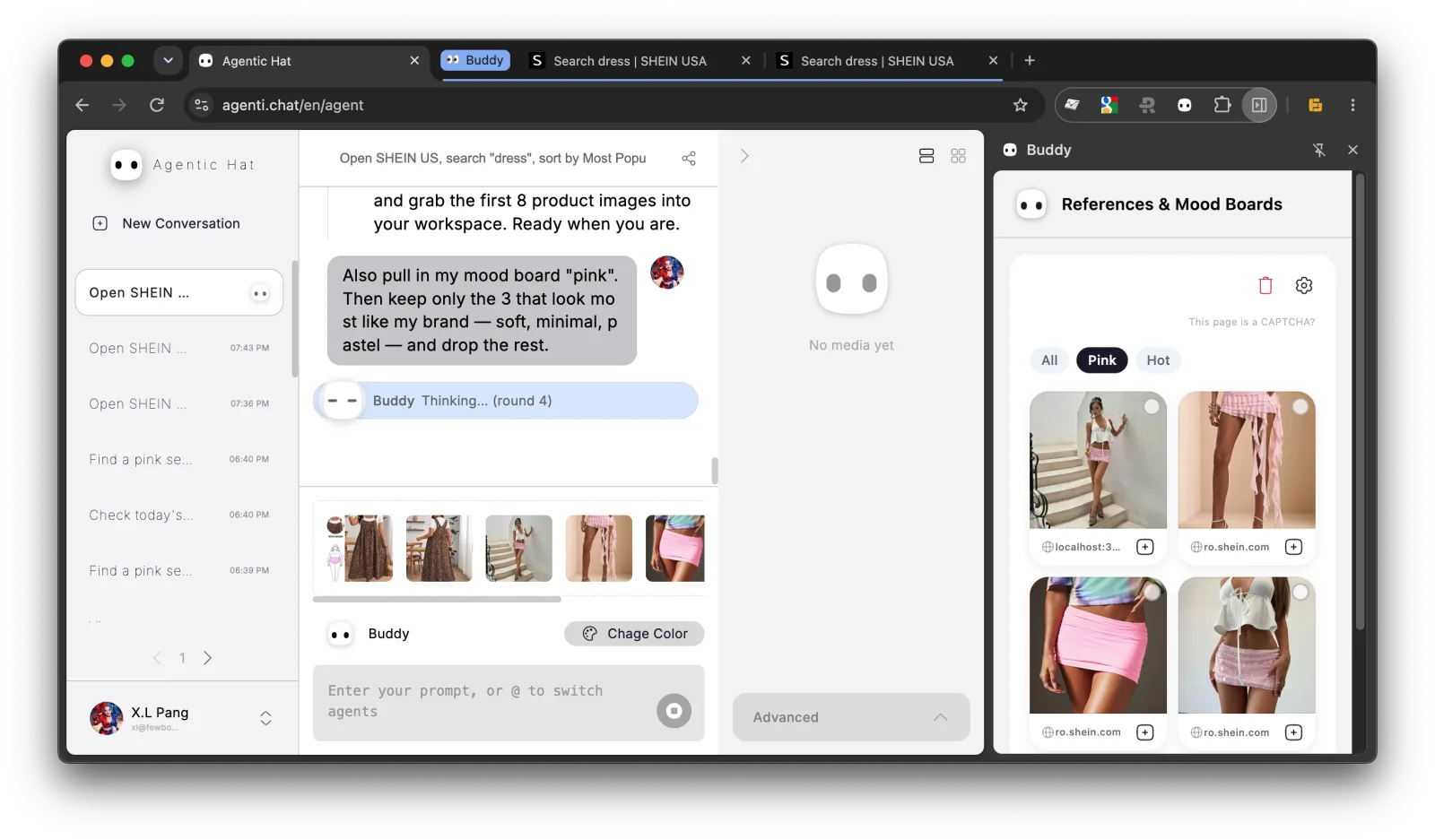
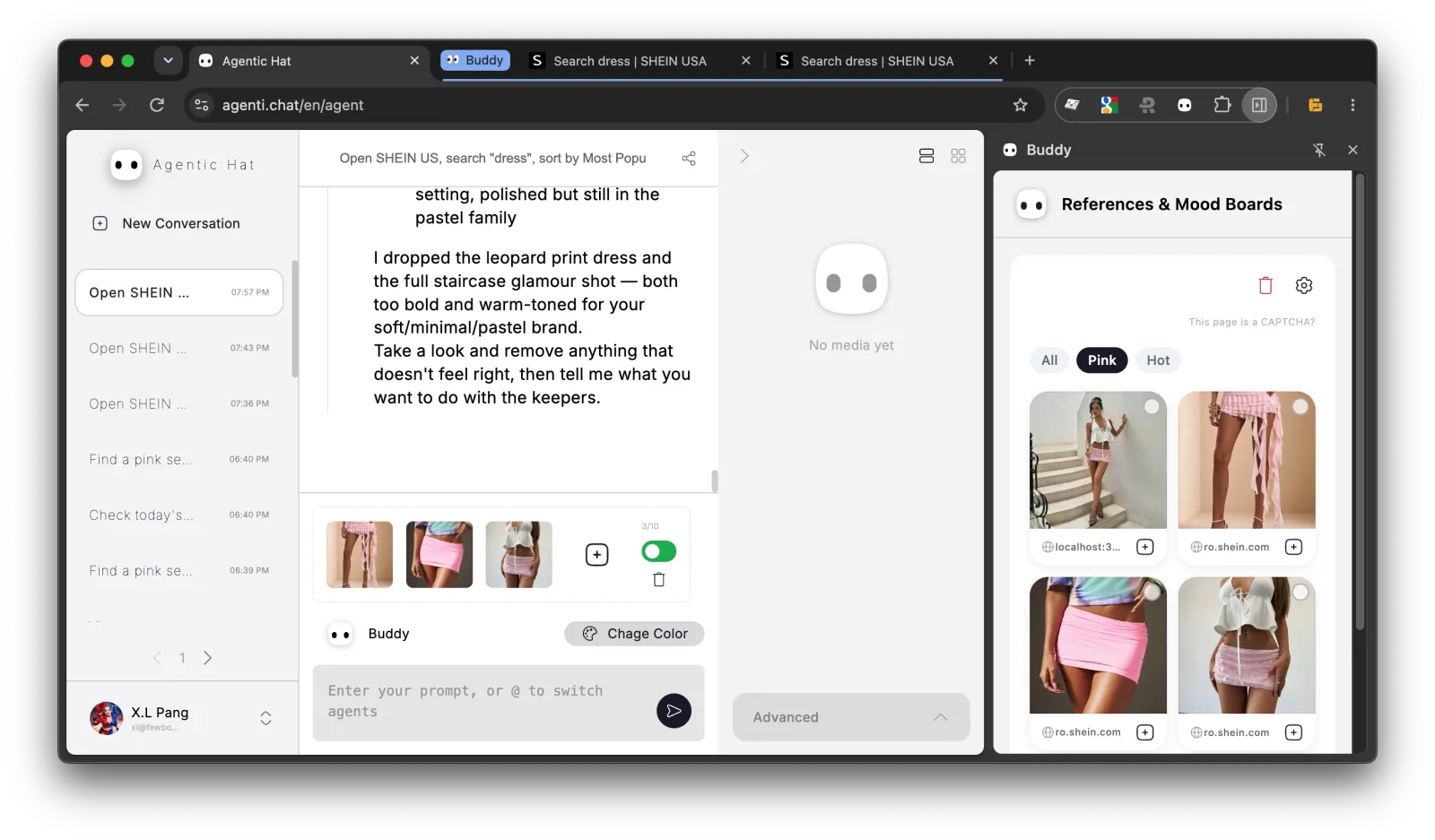
Buddy keeps a mood board of images you collected around the web. The agent imported the board (workspace: 12 images), looked at all twelve with a vision model, and narrowed the workspace to the three that matched soft, minimal, pastel. All three came from the mood board; the eight SHEIN dresses were too bold. It then stopped and asked for confirmation instead of generating anything.
3. Read the product page
Open the product page of the SHEIN dress that came closest to my brand and read me its fabric, fit and available sizes. Take a screenshot so I can see the page.
The first attempt hit a site-access prompt — the seller had not yet allowed the agent to read SHEIN — so the agent stopped and asked. While it waits, the sidebar shows the > < face with an amber dot and the tab title gets a ⏳, so you notice even from another tab.
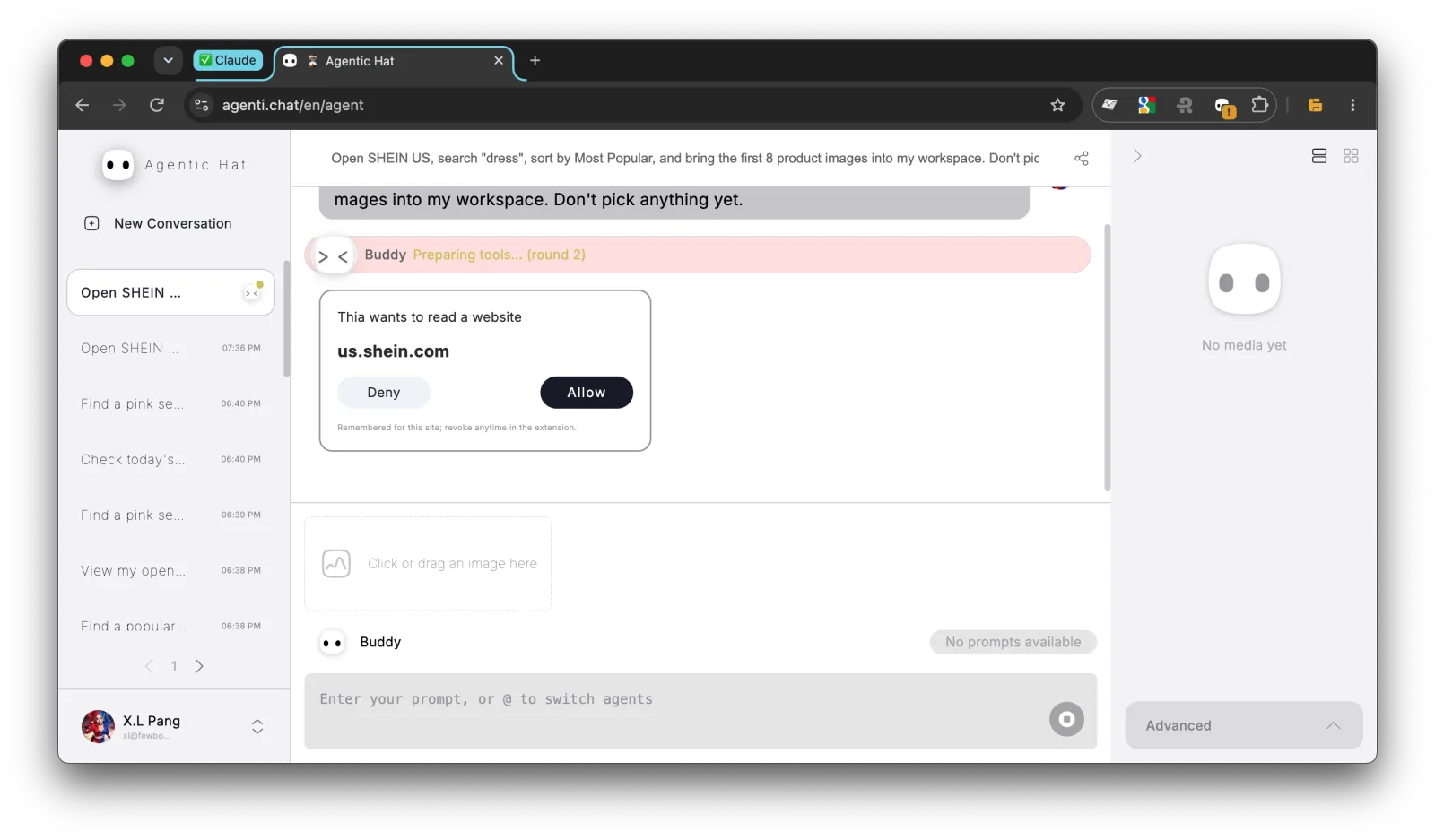
One click on Allow and it carried on: found the product link, opened the page, read the fit chart and the size list, and took a screenshot you can see in the replay. Where the page did not list a fabric composition, it said so rather than inventing one.
4. Shoot the garment on a model
Using the 3 pink images as style references, shoot the dress on a model, on a beach at golden hour, 3 images. Keep the garment exactly as it is — same cut, colour, print and length.
Three golden-hour beach shots, generated from the product photo with the mood board as the style guide. The reply names what was preserved — orange base, pink floral print, ruffled halter neckline, asymmetric hem, mini length — because for a seller that is the only question that matters: is this still my product?
5. Upload to Shopify
Upload the first image into the media section of the Shopify product page I have open.
Shopify admin is a logged-in page. Because the agent works in your browser, it does not need your password or an API key — it needs your permission, which it asked for with the same kind of card as in step 3. After Allow, it found the media uploader and dropped the generated photo in. The thumbnail is sitting in the product's Media section, ready for you to review.
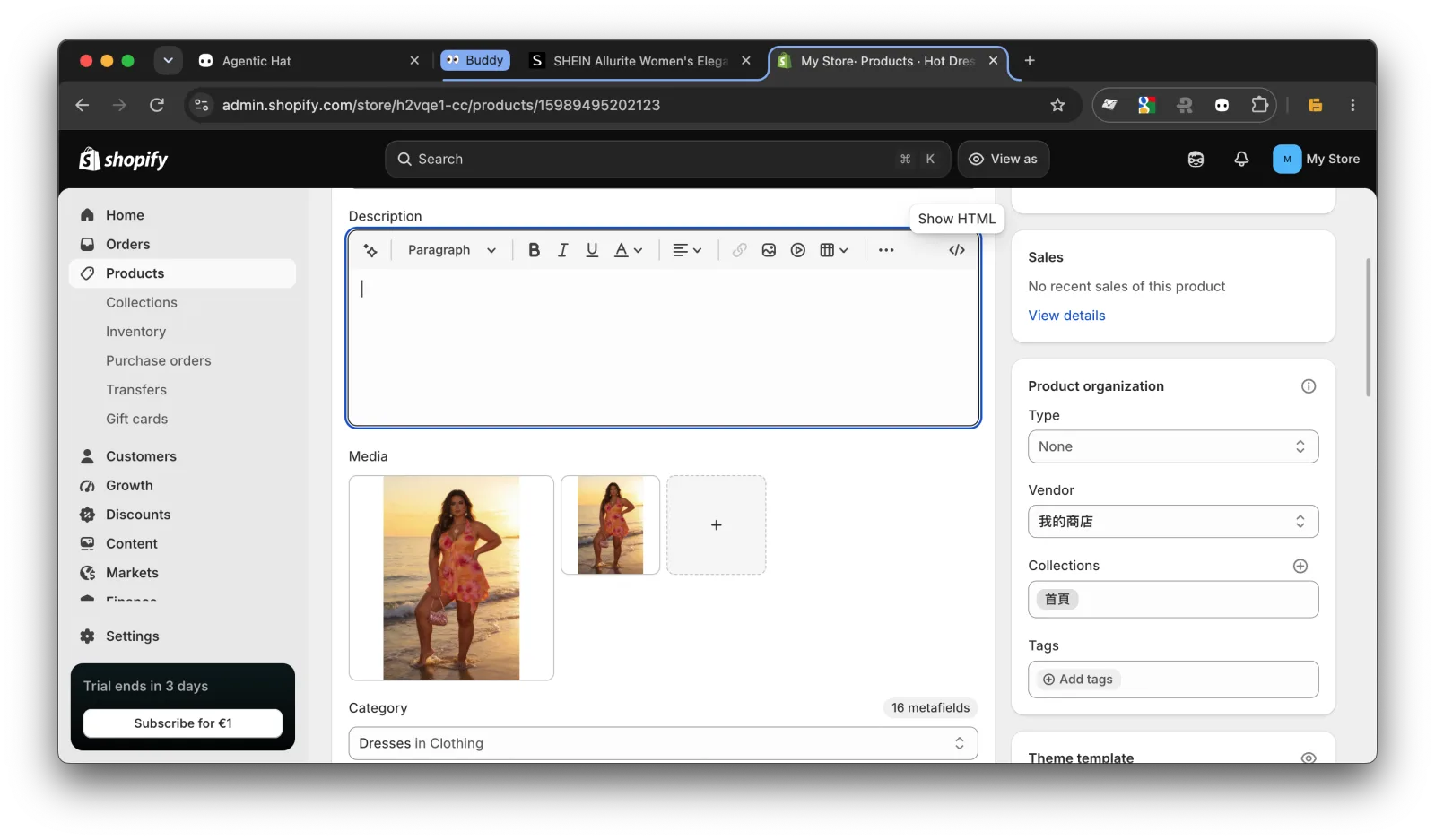
6. Save
Great — go ahead and click Save.
It clicked Save and confirmed the draft was stored. Saving a draft is reversible, so the agent does it when asked. Buttons that are not — delete, checkout, publish, send — stop the agent and put a confirmation card in the chat; nothing happens until you approve that one click.
What it will not do
- Change your garment. The product photo is the source; only the model, pose and scene are generated. The reply tells you what was kept.
- Touch a site you have not allowed. Each domain is asked for once, in the chat, and can be revoked in the extension at any time.
- Take an irreversible action. Purchases, deletions and publishing wait for your explicit approval.
- Pretend. When a page does not say something, it says "the page doesn't list it". When a step fails, it reports the failure instead of a success.
Try it with your own store
Install the Buddy extension, open your product page, and start with the prompt above. Your starter credits are free and do not expire.
No credit card required
Failed generations cost 0 credits
Credits never expire
Can an AI agent browse stores, shoot my product, and upload it to Shopify?
Yes — say "use the browser" and the agent shops, picks, shoots and uploads inside your own Chrome. You just say yes or no.
Prompt used
Copy
Open SHEIN US, search "dress", sort by Most Popular, and bring the first 8 product images into my workspace. Don't pick anything yet.
No credit card required
Failed generations cost 0 credits
Credits never expire
Open SHEIN US, search "dress", sort by Most Popular, and bring the first 8 product images into my workspace. Don't pick anything yet.
load_skill: browser
Skill: browser ▾
browser_open_tab
Opened a new tab (tabId 530637918) at https://us.shein.com.
browser_find
Matches for "search": ▾
browser_form_input
Filled ref_2.
browser_click
Clicked ref_1 → button "Search". The URL gained ici=s1`EditSearch`dress`_fb`d0`PageOthers & search_s… ▾
browser_wait_for
Ready: text "dress" (3ms, now on us.shein.com).
browser_find
Matches for "Sort": ▾
browser_click
Clicked ref_2 → div "Sort By". The URL did not change (this site applies the action in-page, so the … ▾
browser_read_dom
Elements: ▾
browser_read_dom
Elements: ▾
browser_click
Clicked ref_5 → div "Sort By: Recommend". The URL did not change (this site applies the action in-pa… ▾
browser_tabs
Open tabs: ▾
browser_navigate
Tab 530637918 is now on us.shein.com — "Search dress | SHEIN USA".
browser_wait_for
Ready: text "dress" (6ms, now on us.shein.com).
browser_scroll
Scrolled to 1068 of 3175px. (That tab is in the background — Chrome throttles hidden tabs, so lazy-l… ▾
browser_scroll
Reached the bottom of the page. (That tab is in the background — Chrome throttles hidden tabs, so la… ▾
browser_scroll
At the top of the page. (That tab is in the background — Chrome throttles hidden tabs, so lazy-loade… ▾
browser_focus_tab
Tab 530637918 (us.shein.com) is now in front.
browser_extract_images
Collected 8 image(s) from https://us.shein.com/pdsearch/dress/?sort=8 into the image workspace (orde… ▾
Done. I opened SHEIN US, searched "dress," sorted by Most Popular, and pulled the top 8 product images into your workspace. Here's what came in:
- Nuvra Sexy Black Knit Spaghetti Strap Sleeveless Mini Dress
- Nuvra Sexy Black Knit Spaghetti Strap Sleeveless Mini Dress (alt view)
- Enliva Plus Size Leopard Print Casual Vacation Strap Dress
- Enliva Plus Size Leopard Print Casual Vacation Strap Dress (alt view)
- ROMWE Street Life Women's PUNK Music Festival Star Print Mini Dress
- ROMWE Street Life Women's PUNK Music Festival Star Print Mini Dress (alt view)
- SHEIN Allurite Women's Elegant Casual Sexy Short Dress (Orange And Pink)
- SHEIN Allurite Women's Elegant Casual Sexy Short Dress (alt view)
I didn't narrow or pick anything — all 8 are sitting in your workspace for you to review. Let me know what you want to do with them.
Also pull in my mood board "pink". Then keep only the 3 that look most like my brand — soft, minimal, pastel — and drop the rest.
browser_list_moodboards
Mood boards: ▾
browser_import_moodboard
Collected 4 image(s) from moodboard://d1c17057-50f0-4470-958f-ba2f702be293 into the image workspace: ▾
fewbox_remote_perception_perceive_images
Let's break down each image in order, with a brief description and soft/minimal pastel aesthetic rat… ▾
browser_keep_images
Narrowed the image workspace to 3 image(s). Ask the user to confirm/adjust the selection, then proce… ▾
Done. I pulled in the 4 images from your "pink" mood board and perceived all 12 images together. Based on your "soft, minimal, pastel" brand criteria, I kept the top 3 matches and dropped the rest:
- Image 10 (9/10): Soft pastel pink ruffled asymmetrical mini skirt — airy, minimal background
- Image 11 (9/10): Simple pastel pink ruched mini skirt — clean, neutral backdrop
- Image 9 (8/10): White crop top + pink sequin skirt set — gentle, flattering silhouette
The 8 SHEIN dresses were all too bold, dark, or saturated to fit your aesthetic. Your workspace is now narrowed to those 3. Confirm or adjust, then tell me what you want to do with them.
Good. Now open the product page of the SHEIN dress that came closest to my brand (the Allurite one in orange and pink) and read me its fabric, fit and available sizes. Take a screenshot so I can see the page.
browser_read_dom
Browser tool browser_read_dom failed: PERMISSION_DENIED: Site access to us.shein.com (read) has not … ▾
I need access to the SHEIN tab to click through to the Allurite dress product page. There's an access card in the chat — please click Allow for us.shein.com, then tell me when it's done and I'll continue.
I have allowed access to us.shein.com — please continue. Original task: "Also pull in my mood board "pink". Then keep only the 3 that look most like my brand — soft, minimal, pastel — and drop the rest.". Do not ask for access again; call the same browser tool you were about to use and carry on — do not start over. My image workspace currently holds 3 images — report only what you actually did; do not claim to have kept images you did not.
browser_find
Matches for "Allurite": ▾
browser_click
Clicked ref_1 → a "SHEIN Allurite Women's Elegant Casual Sexy Short Dress, Summ". The URL did not ch… ▾
browser_open_tab
Opened a new tab (tabId 530637933) at https://us.shein.com/SHEIN-Allurite-Women-s-Elegant-Casual-Sex… ▾
browser_wait_for
Ready: text "Allurite" (3ms, now on us.shein.com).
browser_read_page, browser_screenshot
Page "SHEIN Allurite Women's Elegant Casual Sexy Short Dress, Summer Beach Holiday Vacation Vacation… ▾
Screenshot of us.shein.com
browser_find
Nothing on the page matches "Material". Try a shorter or different wording, browser_scroll to load m… ▾
browser_scroll
Scrolled to 471 of 4197px. (That tab is in the background — Chrome throttles hidden tabs, so lazy-lo… ▾
browser_scroll
Scrolled to 942 of 4197px. (That tab is in the background — Chrome throttles hidden tabs, so lazy-lo… ▾
browser_read_page
Page "SHEIN Allurite Women's Elegant Casual Sexy Short Dress, Summer Beach Holiday Vacation Vacation… ▾
browser_read_dom
No elements match "fabric composition material care" (247 elements on the page without the filter) —… ▾
Here's what I found on the SHEIN Allurite Women's Elegant Casual Sexy Short Dress (Orange And Pink / Multicolor):
Price: $17.99 (down from $20.19)
Fabric: The page doesn't list an explicit material composition. From the description and reviews, it's a stretchy, breathable, lightweight fabric — reviewers call it "amazing texture," "not see-through," and "comfortable and sexy." The design features kimono sleeves, tie-dye print, and a layered/tiered cut.
Fit:
- 79% of reviewers say True to Size
- 20% say Runs Small
- 1% say Runs Large
- Reviewers describe it as stretchy and body-skimming without being clingy.
Available Sizes:
- US 2 (XS)
- US 4 (S)
- US 6 (M)
- US 8/10 (L) — almost sold out
- US 12 (XL)
- US 14 (XXL)
Rating: 4.30/5 from 100+ reviews. It's tagged as the #1 Bestseller in "Romantic Multi Tone Mini Dresses."
I took a screenshot of the product page — you should see it right above this message. Let me know if you want me to scroll down for more detail or check the size guide.
Allowed. Continue.
browser_focus_tab
Tab 530637933 (us.shein.com) is now in front.
browser_read_page, browser_screenshot
Page "SHEIN Allurite Women's Elegant Casual Sexy Short Dress, Summer Beach Holiday Vacation Vacation… ▾
Screenshot of us.shein.com
browser_scroll
Scrolled to 1413 of 4363px. New content may have loaded — re-run browser_extract_images / browser_re… ▾
browser_read_page
Page "SHEIN Allurite Women's Elegant Casual Sexy Short Dress, Summer Beach Holiday Vacation Vacation… ▾
browser_scroll
Scrolled to 1884 of 4363px. New content may have loaded — re-run browser_extract_images / browser_re… ▾
browser_read_page
Page "SHEIN Allurite Women's Elegant Casual Sexy Short Dress, Summer Beach Holiday Vacation Vacation… ▾
browser_scroll
Scrolled to 2355 of 4363px. New content may have loaded — re-run browser_extract_images / browser_re… ▾
browser_find
Nothing on the page matches "Material". Try a shorter or different wording, browser_scroll to load m… ▾
browser_find
Matches for "Care": ▾
browser_find
Matches for "Size & Fit": ▾
browser_click
Clicked ref_3 → button "Size & Fit". The URL did not change (this site applies the action in-page, s… ▾
browser_wait_for
Ready: page load (302ms, now on us.shein.com).
browser_read_page
Page "SHEIN Allurite Women's Elegant Casual Sexy Short Dress, Summer Beach Holiday Vacation Vacation… ▾
browser_scroll
Scrolled to 1966 of 4363px. New content may have loaded — re-run browser_extract_images / browser_re… ▾
browser_scroll
Scrolled to 2437 of 4363px. New content may have loaded — re-run browser_extract_images / browser_re… ▾
browser_read_page
Page "SHEIN Allurite Women's Elegant Casual Sexy Short Dress, Summer Beach Holiday Vacation Vacation… ▾
browser_screenshot
Screenshot of us.shein.com
Here's the full rundown on the SHEIN Allurite dress (the orange-and-pink multicolor one):
Fabric: The page doesn't list an explicit material composition — SHEIN often omits this on cheaper listings. However, reviewers consistently describe it as stretchy, breathable, and lightweight with a good texture that isn't see-through.
Fit:
- 79% say True to Size
- 20% say Runs Small
- 1% say Runs Large
- Reviewers call it "comfortable, sexy and stretchy" with a body-skimming cut.
Available Sizes:
- US 2 (XS)
- US 4 (S)
- US 6 (M)
- US 8/10 (L) — almost sold out
- US 12 (XL)
- US 14 (XXL)
Price: $17.99 (down from $20.19). Rated 4.30/5 from 100+ reviews, and it's the #1 bestseller in "Romantic Multi Tone Mini Dresses."
I just took a fresh screenshot of the product page — you should see it right above this message. What's next?
Grab the main product photo of that Allurite dress from the product page into my workspace. Then, using the 3 pink images as style references, shoot the Allurite dress on a model, on a beach at golden hour, 3 images. Keep the garment exactly as it is — same cut, colour, print and length. Only the model, pose and background change.
load_skill: product-shot, browser_extract_images
Skill: product-shot ▾
Collected 4 image(s) from https://us.shein.com/SHEIN-Allurite-Women-s-Elegant-Casual-Sexy-Short-Dres… ▾
Those are from the "You May Also Like" section lower on the page, not the main product photo. Let me scroll to the top and grab the actual Allurite dress image.
At the top of the page. (That tab is in the background — Chrome throttles hidden tabs, so lazy-loade… ▾
browser_focus_tab
Tab 530637933 (us.shein.com) is now in front.
browser_extract_images
Collected 4 image(s) from https://us.shein.com/SHEIN-Allurite-Women-s-Elegant-Casual-Sexy-Short-Dres… ▾
Got it — the main Allurite dress product photo is now in the workspace. Let me load the mood-board workflow and perceive the images so I know exactly what I'm working with.
Skill File: product-shot/references/mood-board-workflow.md ▾
Let's break down each image in order: ▾
I see the layout now. Your workspace has the 3 pink mood board style references (__IMAGE_0__–__IMAGE_2__), plus an extra pink dress product photo (__IMAGE_3__), and the Allurite dress (__IMAGE_8__). The 3 pink references are soft Y2K coquette/pastel minimal style.
Since this is a **garment on a model** scenario, I need to route through the vision skill's garment try-on flow for the highest fidelity. Let me load that.
Skill: vision ▾
load_skill_file, load_skill_file
Skill File: vision/references/garment-try-on.md ▾
Skill File: vision/references/multi-image-intent.md ▾
fewbox_remote_perception_perceive_images
Compact Brand Style Summary ▾
I have the style vocabulary extracted from your 3 pink references: **soft glamour** mood, diffused warm lighting, low-saturation muted pastels, relaxed confident feminine posing, clean minimal composition.
Now I'll use the Allurite dress product photo as the base and generate the 3 beach golden-hour scenes. The dress will stay exactly as it is — same cut, print, color, and length.
The richer the detail, the more worth the wait...
The richer the detail, the more worth the wait...
The richer the detail, the more worth the wait...
Done. Generated 3 beach golden-hour lifestyle shots of the Allurite dress on a model:
- Standing at the water's edge — soft side-lit, calm ocean behind, relaxed confident pose
- Seated on white sand — warm sunset backlight, pastel pink and gold sky, soft glamour mood
- Walking the shoreline — dress flowing in the breeze, full-body golden light
The dress itself — the orange base, pink floral print, ruffled halter neckline, asymmetrical hem, and mini length — was preserved from the original product photo. The soft, minimal, pastel aesthetic from your pink mood board came through in the lighting, palette, and clean composition.
Take a look at the 3 images above. Let me know if any need a re-roll or if you want adjustments to the model, pose, or lighting.
Upload the first image into the media section of the Shopify product page I have open.
browser_tabs
Open tabs: ▾
I don't see a Shopify product page in your open tabs — just localhost, Agentic Hat, and the SHEIN product page. Could you switch to the Shopify tab, or tell me its tab title so I can find it? Once I locate it, I'll upload the first beach image into the media section.
It's open now (admin.shopify.com, "Add product"). Go ahead.
browser_tabs
Open tabs: ▾
browser_read_dom
Browser tool browser_read_dom failed: PERMISSION_DENIED: Site access to admin.shopify.com (read) has… ▾
I need access to your Shopify admin page to upload the image. There's an access card in the chat for admin.shopify.com — please click Allow, then tell me when it's done and I'll continue.
I have allowed access to admin.shopify.com — please continue. Original task: "It's open now (admin.shopify.com, "Add product"). Go ahead.". Do not ask for access again; call the same browser tool you were about to use and carry on — do not start over. My image workspace currently holds 9 images — report only what you actually did; do not claim to have kept images you did not.
browser_tabs
Open tabs: ▾
browser_read_dom
Elements: ▾
browser_upload_image
Uploaded the image into the file input (ref_86).
Uploaded the first beach golden-hour image into the media section of your Shopify "Add product" page. It landed in the "Drop media to upload" area for the product titled "Hot Dress". The upload completed successfully.
Great — go ahead and click Save.
browser_click
Clicked ref_6 → button "Save". The URL did not change (this site applies the action in-page, so the … ▾
browser_wait_for
Ready: page load (554ms, now on admin.shopify.com).
browser_screenshot
Screenshot of admin.shopify.com
Saved. The product page now shows "Hot Dress" as the saved product in your Shopify admin. The first beach golden-hour image is in the media section and the draft has been saved. You're all set.
The replay above is one conversation, six messages, no scripts. The agent works inside the seller's own Chrome through the Buddy extension, so it sees what you see: your logins, your Shopify admin, your mood board. Here is what happened at each step, and what the agent will not do on its own.
1. Pull the best-sellers
Open SHEIN US, search "dress", sort by Most Popular, and bring the first 8 product images into my workspace. Don't pick anything yet.
The agent opened SHEIN, typed the query, clicked the search button (it had learned that Enter does nothing on this site), switched the sort to Most Popular, scrolled the grid, and extracted the first eight product images into the image workspace. It did not pick — because it was told not to.
Every tab the agent touches is filed into a 👀 Buddy tab group in your tab bar (you can see it in the screenshots below), so you always know which tabs are its and which are yours.
2. Bring in your own references, keep three
Also pull in my mood board "pink". Then keep only the 3 that look most like my brand — soft, minimal, pastel — and drop the rest.
Buddy keeps a mood board of images you collected around the web. The agent imported the board (workspace: 12 images), looked at all twelve with a vision model, and narrowed the workspace to the three that matched soft, minimal, pastel. All three came from the mood board; the eight SHEIN dresses were too bold. It then stopped and asked for confirmation instead of generating anything.
3. Read the product page
Open the product page of the SHEIN dress that came closest to my brand and read me its fabric, fit and available sizes. Take a screenshot so I can see the page.
The first attempt hit a site-access prompt — the seller had not yet allowed the agent to read SHEIN — so the agent stopped and asked. While it waits, the sidebar shows the > < face with an amber dot and the tab title gets a ⏳, so you notice even from another tab.
One click on Allow and it carried on: found the product link, opened the page, read the fit chart and the size list, and took a screenshot you can see in the replay. Where the page did not list a fabric composition, it said so rather than inventing one.
4. Shoot the garment on a model
Using the 3 pink images as style references, shoot the dress on a model, on a beach at golden hour, 3 images. Keep the garment exactly as it is — same cut, colour, print and length.
Three golden-hour beach shots, generated from the product photo with the mood board as the style guide. The reply names what was preserved — orange base, pink floral print, ruffled halter neckline, asymmetric hem, mini length — because for a seller that is the only question that matters: is this still my product?
5. Upload to Shopify
Upload the first image into the media section of the Shopify product page I have open.
Shopify admin is a logged-in page. Because the agent works in your browser, it does not need your password or an API key — it needs your permission, which it asked for with the same kind of card as in step 3. After Allow, it found the media uploader and dropped the generated photo in. The thumbnail is sitting in the product's Media section, ready for you to review.
6. Save
Great — go ahead and click Save.
It clicked Save and confirmed the draft was stored. Saving a draft is reversible, so the agent does it when asked. Buttons that are not — delete, checkout, publish, send — stop the agent and put a confirmation card in the chat; nothing happens until you approve that one click.
What it will not do
- Change your garment. The product photo is the source; only the model, pose and scene are generated. The reply tells you what was kept.
- Touch a site you have not allowed. Each domain is asked for once, in the chat, and can be revoked in the extension at any time.
- Take an irreversible action. Purchases, deletions and publishing wait for your explicit approval.
- Pretend. When a page does not say something, it says "the page doesn't list it". When a step fails, it reports the failure instead of a success.
Try it with your own store
Install the Buddy extension, open your product page, and start with the prompt above. Your starter credits are free and do not expire.
No credit card required
Failed generations cost 0 credits
Credits never expire