如何用 AI 做一张职业头像?
上传一张自拍,描述想要的风格,点击生成——几分钟。
使用的 Prompt
复制
Turn this selfie into a professional corporate headshot — head-and-shoulders, eye-level, soft studio lighting, neutral office-blur background, business-casual attire, natural approachable expression. Keep my face and identity exactly the same — same features, no beautifying into a different person. Give me a few variations.
无需信用卡
生成失败不扣积分
积分永不过期
Turn this selfie into a professional corporate headshot — head-and-shoulders, eye-level, soft studio lighting, neutral office-blur background, business-casual attire, natural approachable expression. Keep my face and identity exactly the same — same features, no beautifying into a different person. Give me a few variations.
load_skill: vision
Skill: vision ▾
fewbox_remote_vision_edit_image
细节越丰富越值得等待...
fewbox_remote_vision_edit_image, fewbox_remote_vision_edit_image, fewbox_remote_vision_edit_image
细节越丰富越值得等待...
细节越丰富越值得等待...
细节越丰富越值得等待...
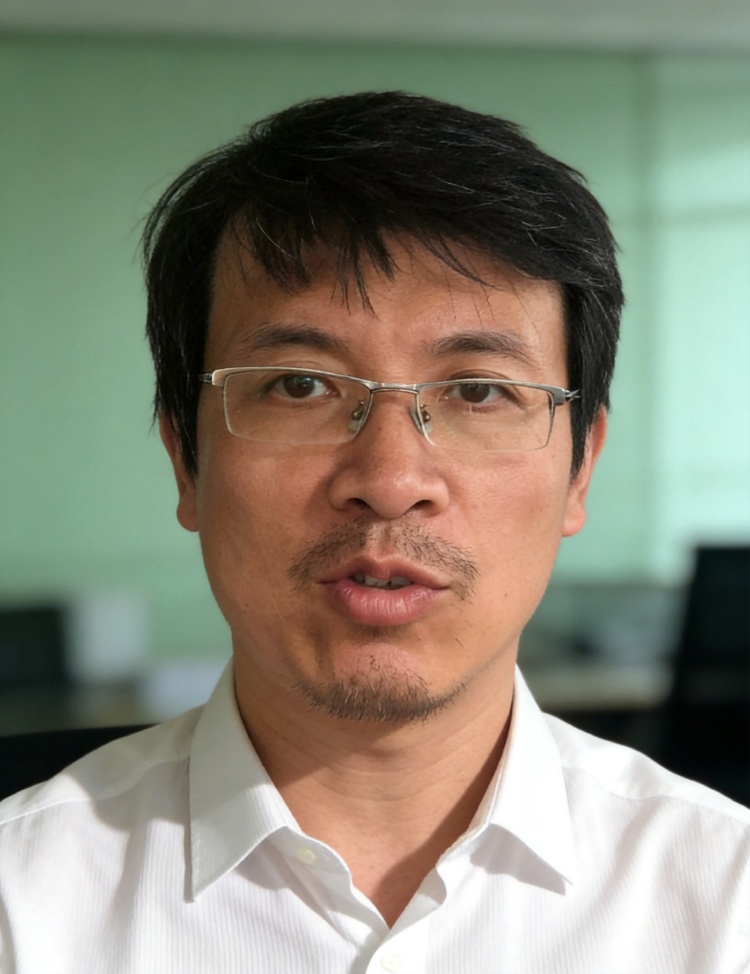
I see the selfie - you've got glasses and a casual indoor setting with some plants behind you. Let me create several professional headshot variations for you, keeping your exact face and features while changing the setting and attire.
细节越丰富越值得等待...
细节越丰富越值得等待...
[Blocked] This tool has been called too many times in this conversation turn. Please stop calling to… ▾
[Blocked] This tool has been called too many times in this conversation turn. Please stop calling to… ▾
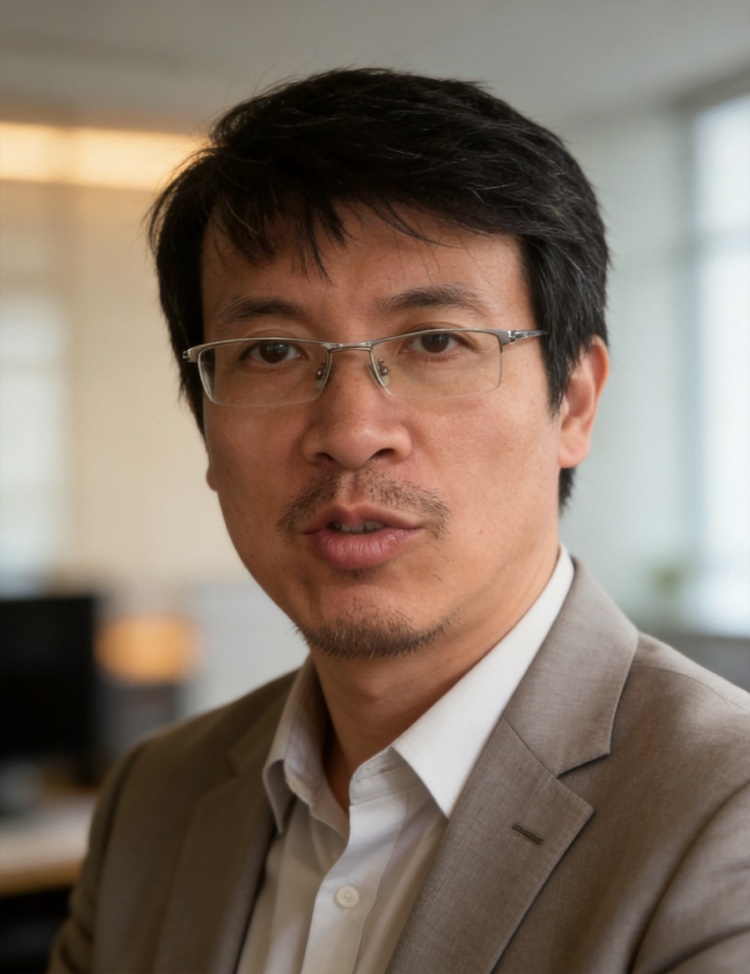
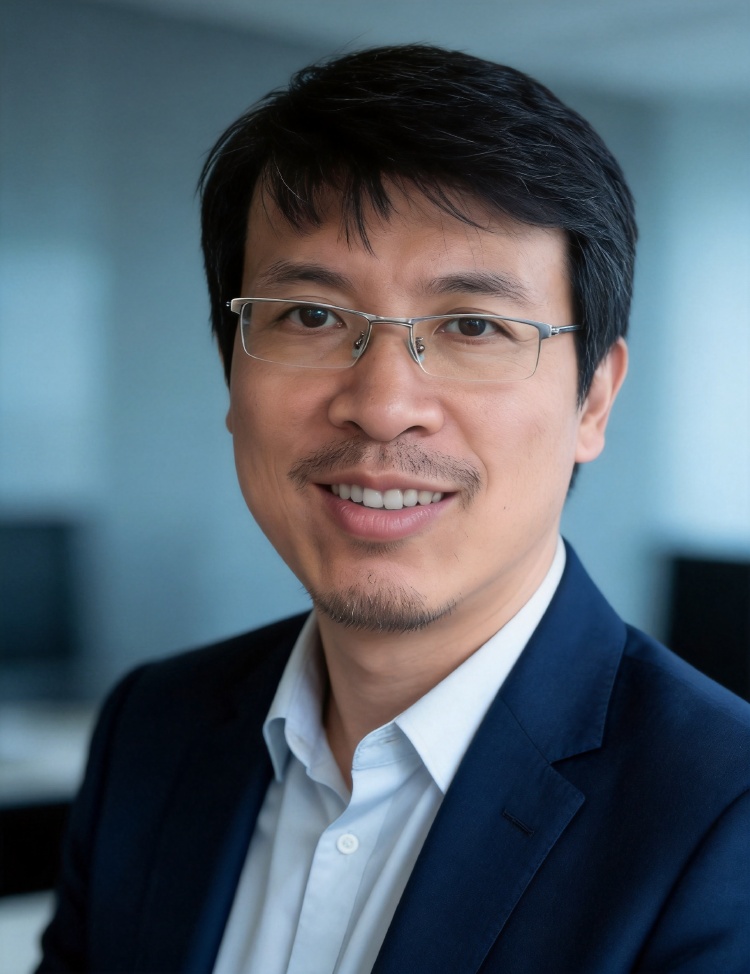
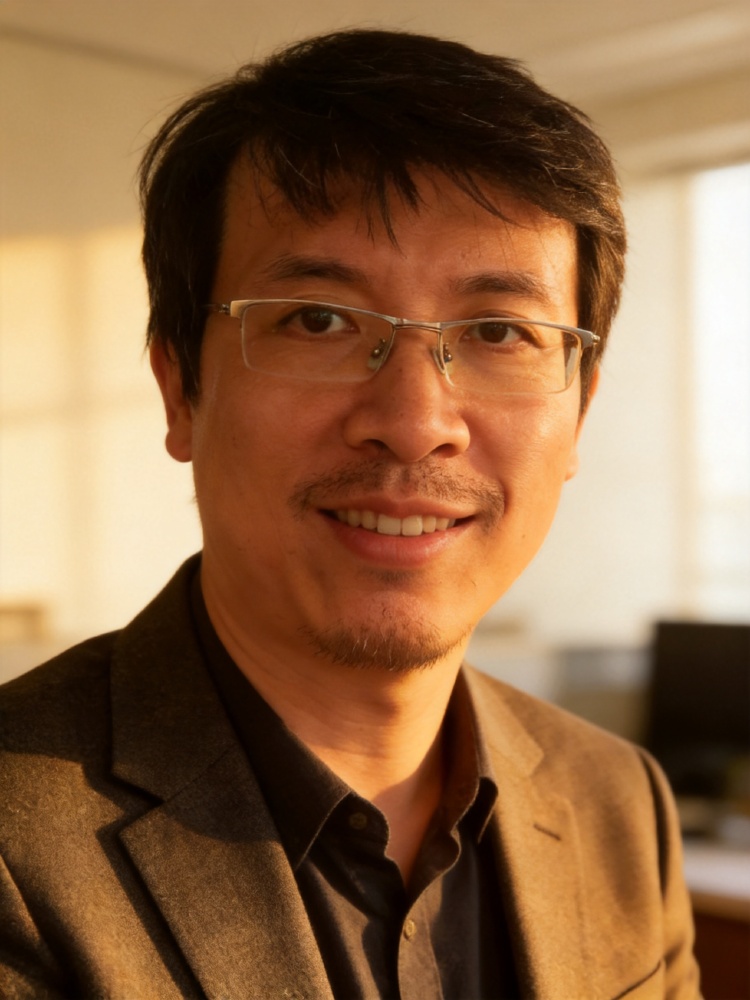
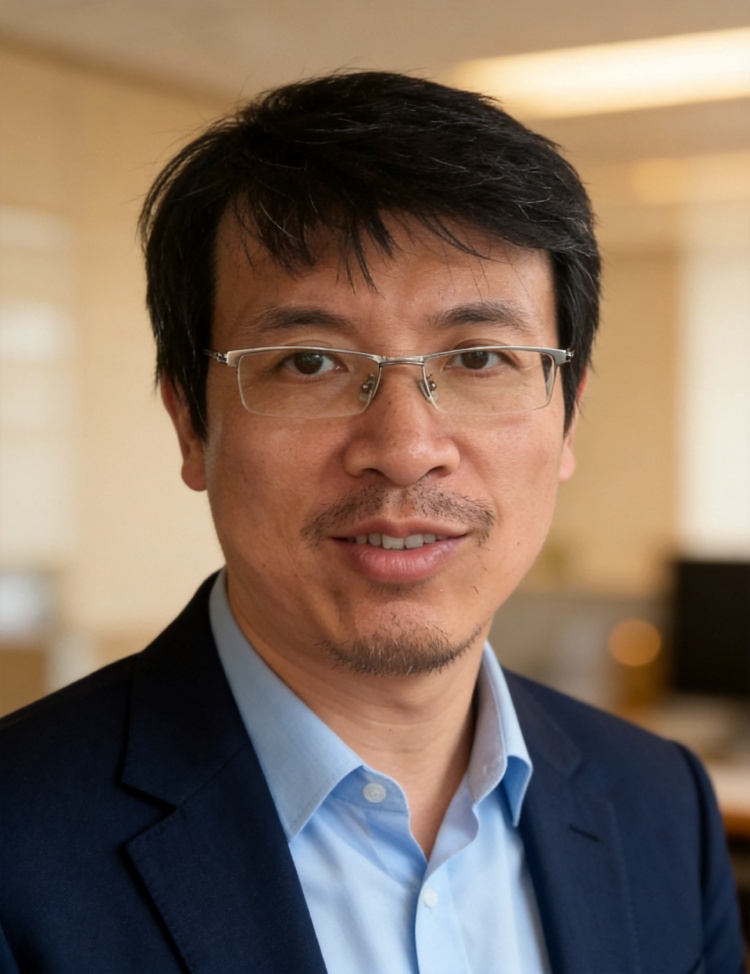
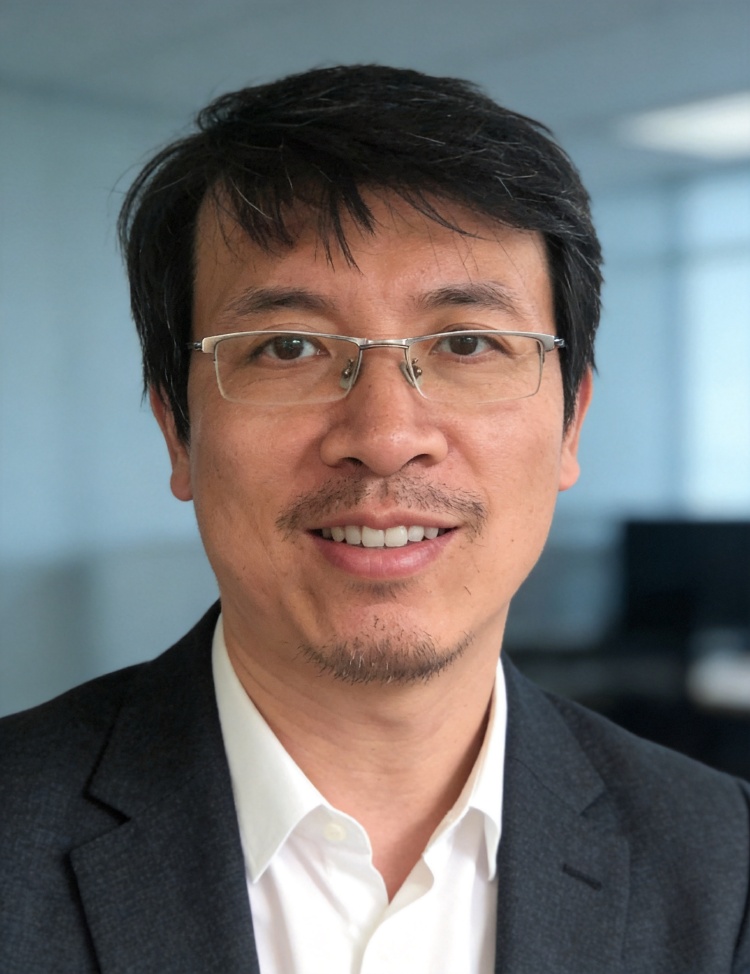
Here are 4 professional corporate headshot variations for you:
Variation 1 — Warm beige office background, navy blazer, soft warm lighting
Variation 2 — Cool gray-blue background, charcoal blazer, clean even lighting
Variation 3 — Cream minimalist background, forest green blazer, golden-hour style lighting
Variation 4 — Light gray background, light gray blazer, neutral balanced lighting
Each keeps your exact face, features, and glasses — just transformed into a professional studio setting with business-casual attire and that soft office-background blur you wanted. They should work well for LinkedIn, company websites, or any professional profile.
Take a look and let me know if you'd like any adjustments — different background tones, attire colors, or lighting style.
职业头像过去意味着约摄影师。用 AI,您上传一张自拍、描述风格,几分钟就能得到一张适合职场的肖像。方法如下——并对质量说句实话。
分步操作
- 从一张清晰的正面自拍开始。 均匀的自然光、清晰的面部,能给 AI 最多信息——自拍越好,成片越像您。
- 描述您想要的头像。 着装(「藏青西装、白衬衫」)、背景(「柔和灰影棚」或「虚化办公室」)、构图(「头肩、平视」)。
- 生成并挑选。 几分钟得到几张备选,挑一张最像您、最精致的。
- 用大白话微调。 「光暖一点」「背景深一点」「带一点微笑」——直到满意。
能直接放 LinkedIn 吗?
可以——干净、光线好、商务着装的肖像,正是 LinkedIn、简历或公司主页需要的,而单张自拍出的成片确实很扎实:专业、且认得出是您。多生成几张挑您最满意的;想要最贴合,再补一两张自拍能让模型更好地还原您的脸。
ChatGPT 能做头像吗?
它能修图,但通用工具往往会重绘您的脸——悄悄把您变成"不太是您"的人,这就违背了头像的意义。专用 agent 被要求保留您真实的脸,只改着装、光线和背景。
免费 vs 付费头像工具
免费工具(Canva、Adobe Firefly、NoteGPT)快,但常常质量低或带水印;付费服务(HeadshotPro、Aragon、Betterpic)训练个人模型收 $29–59。这里介于两者之间:永不过期的免费启动额度、无水印,让您先做出一张真实头像、判断满意再付费。
我的照片安全吗?
自拍很私人。您的照片仅用于产出您的结果——不出售、不用于训练公开模型——且您可删除。上传前请务必确认任何头像工具会留下什么。
常见问题
有免费的 AI 头像生成器吗?
有——您可以在这里用永不过期的免费启动额度起步,够做一张真实头像再付费。无水印、不强制订阅。
ChatGPT 能做职业头像吗?
它能修图,但通用工具往往会重绘您的脸、改变相似度。专用头像 agent 会保留您真实的脸,只改着装、光线和背景。
AI 头像够放 LinkedIn 吗?
够——干净、商务着装、光线好的肖像正是 LinkedIn 想要的,成片专业、认得出是您。多生成几张挑您最满意的。
哪个 AI 头像生成器最好?
最好的那个能保住您真实的相似度、且不用先付一大笔就给出可用质量。用"像不像您"和"能不能先免费试"去衡量任何工具。
需要很多张照片吗?
不需要——一张清晰的正面自拍即可起步。更多或更好的自拍能让成片更贴合您的脸,但一张好照片就够试。
我上传的照片私密吗?
您的照片仅用于产出结果,不出售、不用于训练公开模型,且您可删除。自拍敏感——请确认任何工具会留下什么。
无需信用卡
生成失败不扣积分
积分永不过期
如何用 AI 做一张职业头像?
上传一张自拍,描述想要的风格,点击生成——几分钟。
使用的 Prompt
复制
Turn this selfie into a professional corporate headshot — head-and-shoulders, eye-level, soft studio lighting, neutral office-blur background, business-casual attire, natural approachable expression. Keep my face and identity exactly the same — same features, no beautifying into a different person. Give me a few variations.
无需信用卡
生成失败不扣积分
积分永不过期
Turn this selfie into a professional corporate headshot — head-and-shoulders, eye-level, soft studio lighting, neutral office-blur background, business-casual attire, natural approachable expression. Keep my face and identity exactly the same — same features, no beautifying into a different person. Give me a few variations.
load_skill: vision
Skill: vision ▾
fewbox_remote_vision_edit_image
细节越丰富越值得等待...
fewbox_remote_vision_edit_image, fewbox_remote_vision_edit_image, fewbox_remote_vision_edit_image
细节越丰富越值得等待...
细节越丰富越值得等待...
细节越丰富越值得等待...
I see the selfie - you've got glasses and a casual indoor setting with some plants behind you. Let me create several professional headshot variations for you, keeping your exact face and features while changing the setting and attire.
细节越丰富越值得等待...
细节越丰富越值得等待...
[Blocked] This tool has been called too many times in this conversation turn. Please stop calling to… ▾
[Blocked] This tool has been called too many times in this conversation turn. Please stop calling to… ▾
Here are 4 professional corporate headshot variations for you:
Variation 1 — Warm beige office background, navy blazer, soft warm lighting
Variation 2 — Cool gray-blue background, charcoal blazer, clean even lighting
Variation 3 — Cream minimalist background, forest green blazer, golden-hour style lighting
Variation 4 — Light gray background, light gray blazer, neutral balanced lighting
Each keeps your exact face, features, and glasses — just transformed into a professional studio setting with business-casual attire and that soft office-background blur you wanted. They should work well for LinkedIn, company websites, or any professional profile.
Take a look and let me know if you'd like any adjustments — different background tones, attire colors, or lighting style.
职业头像过去意味着约摄影师。用 AI,您上传一张自拍、描述风格,几分钟就能得到一张适合职场的肖像。方法如下——并对质量说句实话。
分步操作
- 从一张清晰的正面自拍开始。 均匀的自然光、清晰的面部,能给 AI 最多信息——自拍越好,成片越像您。
- 描述您想要的头像。 着装(「藏青西装、白衬衫」)、背景(「柔和灰影棚」或「虚化办公室」)、构图(「头肩、平视」)。
- 生成并挑选。 几分钟得到几张备选,挑一张最像您、最精致的。
- 用大白话微调。 「光暖一点」「背景深一点」「带一点微笑」——直到满意。
能直接放 LinkedIn 吗?
可以——干净、光线好、商务着装的肖像,正是 LinkedIn、简历或公司主页需要的,而单张自拍出的成片确实很扎实:专业、且认得出是您。多生成几张挑您最满意的;想要最贴合,再补一两张自拍能让模型更好地还原您的脸。
ChatGPT 能做头像吗?
它能修图,但通用工具往往会重绘您的脸——悄悄把您变成"不太是您"的人,这就违背了头像的意义。专用 agent 被要求保留您真实的脸,只改着装、光线和背景。
免费 vs 付费头像工具
免费工具(Canva、Adobe Firefly、NoteGPT)快,但常常质量低或带水印;付费服务(HeadshotPro、Aragon、Betterpic)训练个人模型收 $29–59。这里介于两者之间:永不过期的免费启动额度、无水印,让您先做出一张真实头像、判断满意再付费。
我的照片安全吗?
自拍很私人。您的照片仅用于产出您的结果——不出售、不用于训练公开模型——且您可删除。上传前请务必确认任何头像工具会留下什么。
常见问题
有免费的 AI 头像生成器吗?
有——您可以在这里用永不过期的免费启动额度起步,够做一张真实头像再付费。无水印、不强制订阅。
ChatGPT 能做职业头像吗?
它能修图,但通用工具往往会重绘您的脸、改变相似度。专用头像 agent 会保留您真实的脸,只改着装、光线和背景。
AI 头像够放 LinkedIn 吗?
够——干净、商务着装、光线好的肖像正是 LinkedIn 想要的,成片专业、认得出是您。多生成几张挑您最满意的。
哪个 AI 头像生成器最好?
最好的那个能保住您真实的相似度、且不用先付一大笔就给出可用质量。用"像不像您"和"能不能先免费试"去衡量任何工具。
需要很多张照片吗?
不需要——一张清晰的正面自拍即可起步。更多或更好的自拍能让成片更贴合您的脸,但一张好照片就够试。
我上传的照片私密吗?
您的照片仅用于产出结果,不出售、不用于训练公开模型,且您可删除。自拍敏感——请确认任何工具会留下什么。